How to set up your team, what every page does, and the fun stuff hiding in the corners. Search for anything, or start with the first steps.
/
Welcome to HB Dynasty
HB Dynasty is the Homeward Bound Football League's clubhouse. Sleeper runs the league: your roster, lineups and trades live there. This site adds everything around it: standings and playoff odds, the bracket, stats, scouting, and a scoreboard with its own TV network.
Getting started
New to the league site? Start here: log in, dress up your franchise, and learn how the site and Sleeper fit together.
What HB Dynasty is, your first ten minutes, and a map of the site.
What HB Dynasty is
The league runs on Sleeper. Your roster, your lineup, waiver claims and trades all happen in the Sleeper app. HB Dynasty is the league's own website, built on top of Sleeper. It reads everything from Sleeper and adds what Sleeper doesn't have:
Division standings with the league's real tiebreakers, and playoff odds.
The playoff and consolation brackets, and the rookie draft order they decide.
A weekly Power Poll with position grades.
A front office for every team: lineup check, position rooms, depth chart and draft picks.
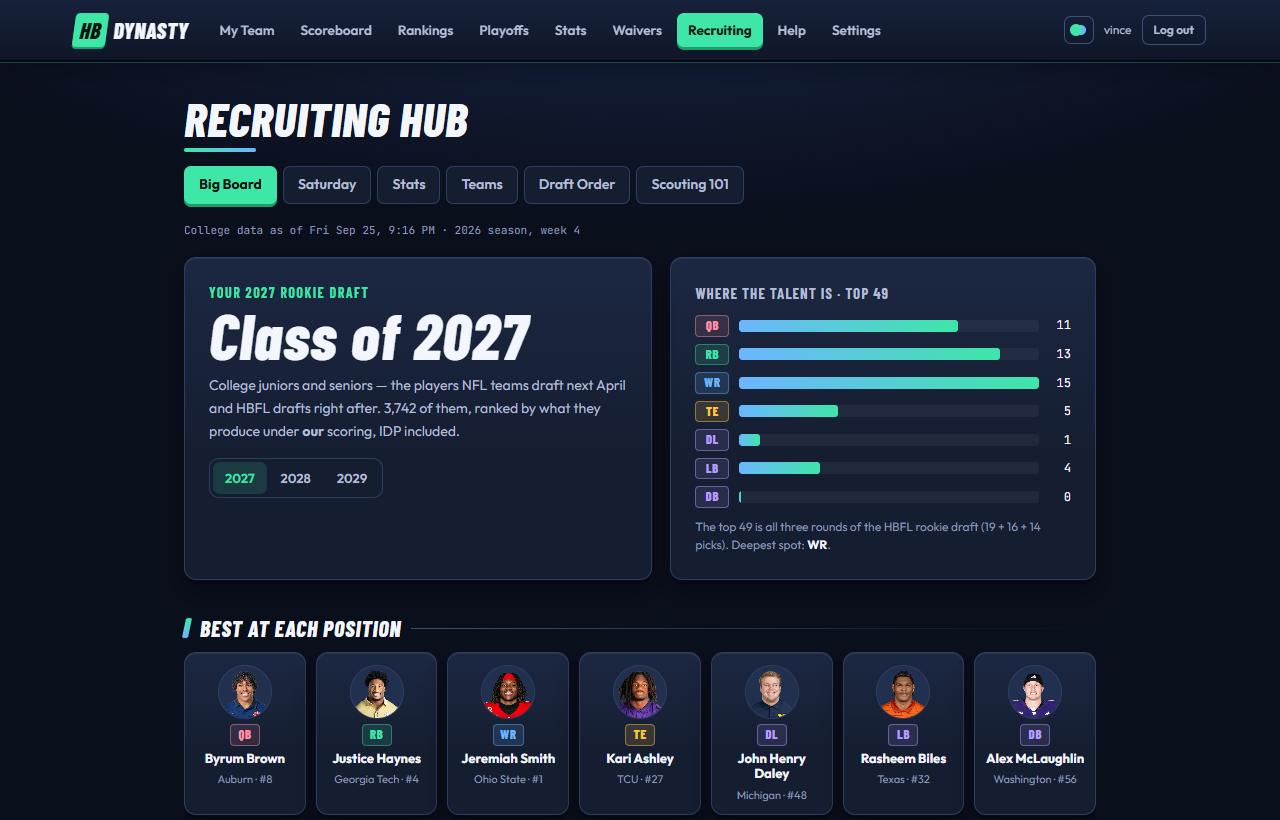
Stats scored under HBFL rules, a waiver wire ranked for this league, and a college scouting hub for future rookies.
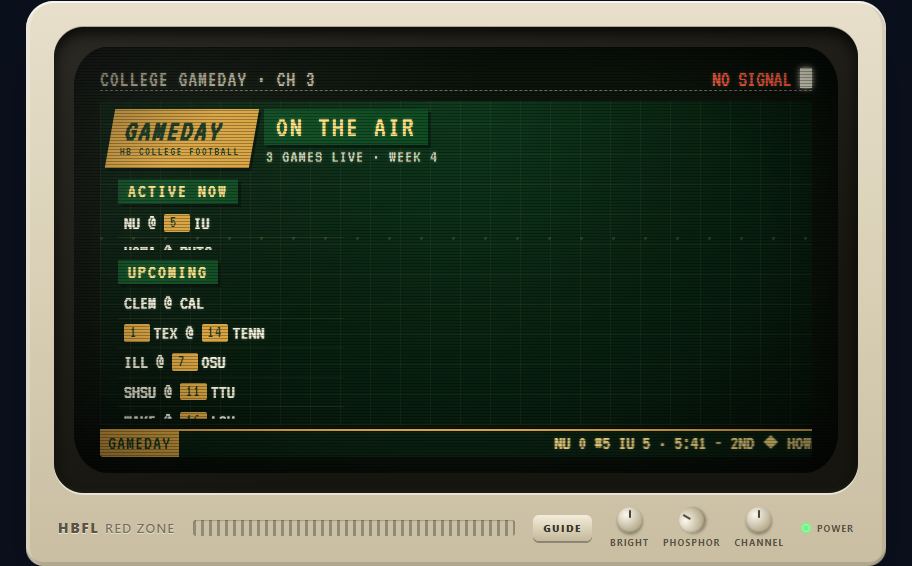
A live Scoreboard with its own 1980s-style TV network.
The one rule
HB Dynasty never changes anything in Sleeper. If you want to move a player, set a lineup or make a trade, do it in Sleeper. This site catches up within a minute or so.
Your first ten minutes
Log in and choose a password.The commissioner gives you a username and a temporary password. The first time you log in, the site asks you to pick your own. More on logging in.
Make the franchise yours.On My Team, open the Owner's Box tab and fill it in: team colors, abbreviation, motto, home field. Your colors show up across the whole site. How to set up your team.
Pick a theme.Tap the round swatch next to your name (or on a phone, Theme under Menu). Light, dark, or your own team colors. About themes.
Check your lineup.The Front Office tab compares your lineup with Sleeper's projections and tells you if a bench player should start. Front Office walkthrough.
Turn on the TV.Open the Scoreboard on a game day. Meet the channels.
Finding your way around
The menu along the top has seven stops (on a phone, tap Menu at the top right to see them all):
Look up any player, NFL club, franchise, prospect or school from the menu bar.
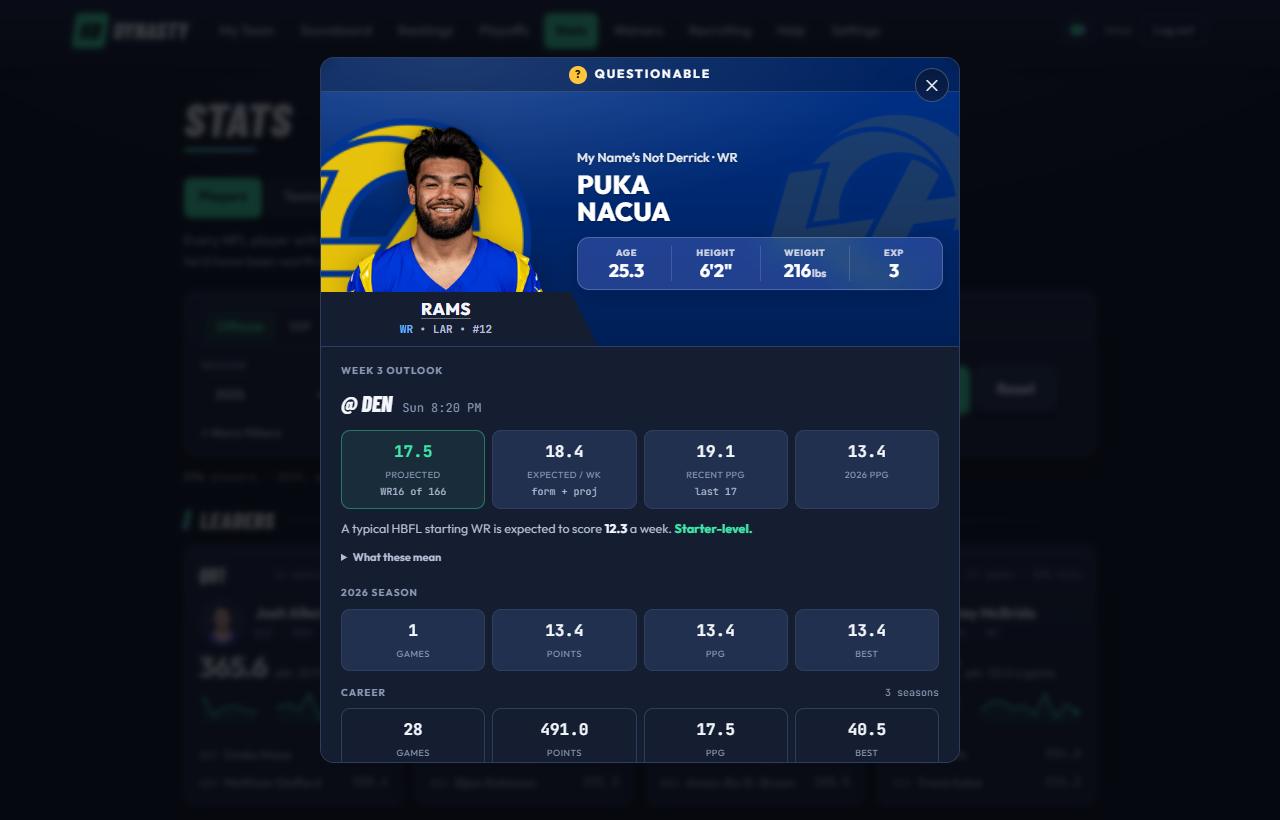
The magnifying glass in the menu bar (Search on a wide screen) looks up anything in one box: NFL players, NFL clubs, HBFL franchises, college prospects and college programs. It's there on every page.
Opening it
Tap the magnifying glass at the top of any page.
On a keyboard, press CtrlK (⌘K on a Mac) or / from anywhere outside this guide.
What it finds
Results come back in five groups, each with pictures so you can tell who's who at a glance:
Players
NFL players with their headshot, club logo, position, age, any injury, points per game this season, and the HBFL team that holds them. Free agent means nobody in the league has him. Players open the player card.
NFL Clubs
The club's logo, record and next game (opponent, kickoff and TV). Opens its club card; Ctrl+click opens the full NFL Rosters page instead.
HBFL Teams
Each franchise's badge, owner, division, record and points for. Opens its Franchise page. You can search by an owner's name too.
Prospects
College players with their school, class, Big Board rank and Prospect Score. Opens the prospect page in Recruiting.
Colleges
The school's logo, conference, record and AP ranking. Opens its team card; Ctrl+click opens its page in Recruiting instead.
If a team you look up is playing right now (an NFL club, an HBFL franchise or a college program), its live game comes first, with the score and the clock: tap it for the game page. The best match across all five sits under it as the Top hit, in its colors. The chips under the box narrow the results to one group and show more of it; More players → does the same.
Smart searches
You don't need a name. The box understands positions, clubs and schools:
wr
A position alone lists the best players and prospects at it.
chiefs
A club's nickname brings up the club and its top players.
det rb
A club's abbreviation or city with a position: the Lions' running backs.
ohio state
A school brings up the program and its best prospects; alabama wr narrows them to receivers.
ju jeff
Bits of a name work. Every word has to start a word in the name.
Before you type
An empty box shows your recent lookups (kept on this device only), all fourteen franchises with yours first, and the players Sleeper users are adding most right now.
Keys
↑↓
Move through the results.
Enter
Open the highlighted result. Ctrl+click opens a page in a new tab.
Your login, choosing a password the first time, invite links and logging out.
Your login
Every owner has their own account. Log in at the login page with the username the commissioner gave you. The site keeps you signed in for two weeks on each device.
Accounts start with a temporary password. The first time you log in, the site asks you to choose your own before it shows anything else:
Log in with the temporary password.You'll see Set Your Password, with your team's name on a card.
Type your new password twice.At least 8 characters, not all numbers, not too close to your username, and not the temporary one.
Press Set Password.You go straight to the page you were heading for. Use the new password from now on.
Forgot it?
Tap Forgot your password? on the login page and enter your username or email. We email you a 6-digit code (good for 15 minutes); enter it with a new password, then log in with that. The code goes to the email on your Account page, so add one there now if you haven't, and tap the link we email you to confirm it (the menu reminds owners until it's done; the Account page can send a new link). Whenever your password changes, we email you a heads-up, so you'd know if it wasn't you. No email on your account? Ask the commissioner to reset your password.
Your account page
Your username at the top right (on a phone, Account under Menu) opens your Account page, where you can change your name, email and password any time.
The weather app uses the same login
The HBWX weather app (weather.jmco.app) signs in with your account here: tap SIGN IN at the top of it. Your home place, saved places, °F/°C and display are then kept with your account and follow you to every device; the Account page shows what's saved. The shared view-only login can't keep weather settings, since everyone uses it.
So do the games
The games (games.jmco.app: Sudoku, Chess, 2048, Five Letters, Crossword, Word Tiles, Solitaire, Tanks and Sea Battle) open right here too: Games in the menu shows them under this site's own bar, so the TV, alerts, search and chat stay a tap away while you play, and you're already signed in. On the games site itself, tap Sign in at the top of any game. Your games in progress, your stats (Your stats on the games' front page) and 80s mode are then kept with your account, so you can start a game on your phone and finish it on a computer. Only you see them.
Signed in, you can also play friends on their own phones or computers: Word Tiles (make words on a board, like the classic tile game), Tanks (take turns lobbing shells across hills in the wind; the last tank standing wins), each for two to four players, Chess, Sea Battle (you each set a fleet in secret, then take turns firing until one fleet is sunk; neither of you can see the other's ships), and Whodunit for two to six (a murder at Ashcombe Manor: roll, move into rooms, suggest who did it and with what, and the others show you cards in secret until someone works out the three cards in the case file). Open Play with friends on the games' front page: pick who to play from people you've played before, or get an invite link to send anyone new (a game for three or four can mix both, and starts when everyone's in, or when you start it); you each take your turn whenever you like, and the front page says when it's your turn, as does the number beside Games in the menu. An owner you invite by name also hears about it in the chat's Alerts, with a button straight into the game. Waiting for players? Post in chat puts the open spots up in the league chat, and anyone there can tap in; the card says how many are in, then who's playing and who won. With notifications on (the bell, Games with friends), your phone tells you when it's your turn, when someone invites you, and who won, and the app's icon counts the games waiting on you. At the end of a game, Rematch invites the same friend again. Your friend needs their own HB Dynasty account (a fan account is fine), and you'll each see the other's name; nobody else sees your games.
Joining with an invite link
If the commissioner sent you an invite link instead, open it and fill in Create Your Account: a username, your name, email and a password. Claim Team & Join League creates the account and hands you your team. An invite works once and expires after 14 days; if yours says it's no longer valid, ask for a new one.
Logging out
Log out is at the top right on a computer, and on a phone under Menu at the top right, at the very bottom under You.
On a computer, any pages that don't fit across the menu (often Draft order, Records, College Saturday, the Tuesday Edition, Games, HBWX, Help and the commissioner's pages; the same pages as the phone's Menu) sit under More ▾ at the end of it. On a phone the menu scrolls sideways instead.
Other people using your account
Please don't share your login. Friends and family can follow the league with the shared view-only login instead, and people outside the league can ask for a fan account of their own.
Open the Owner's Box tab.It's the third tab under the big team header, after Front Office and Franchise. Only you see it on your team; other owners don't get the tab.
Make your changes.The header at the top of the page previews them as you type.
Press Save franchise.You'll see "Franchise saved." and the whole league sees the new look.
What you can set
Team name
Up to 50 characters, and no two teams can share a name. Leave it blank to go back to your Sleeper team name. How names and Sleeper work together.
Team colors
A primary and a secondary color. Start from one of eight presets (Burgundy and gold, Navy and orange, Forest and lime, Purple and teal, Black and red, Royal and white, Silver and black, Teal and coral) or pick any two colors.
Abbreviation
2 to 4 letters or numbers, shown on your crest, the scoreboards and team badges. If you don't set one, the site makes one from your team name's initials.
Motto
Up to 60 characters, shown in quotes under your team name.
Stadium name
Up to 60 characters, in the Stadium name box on your stadium tile at the top of the Owner's Box (with everything else about your stadium). It heads the tile and shows as your home field in your header on the Owner's Box. Save name (or Enter) saves it straight away, and a new name gets a mention in the league chat's Alerts.
Home stadium
Adopt one of the 30 NFL stadiums, or one of the college ones: Penn State’s Beaver Stadium (its fans flip cards to spell WE ARE across the far grandstand), Rutgers’ SHI Stadium (its cannon fires) or Michigan Stadium, the Big House; or one that's gone: Philadelphia's Veterans Stadium, the Vet, with the Liberty Bell on its roof. It becomes the stadium tile (an 8-bit snow globe of it under the real weather there, the temperature and wind, and a folded Hourly forecast & stadium facts section) on My Team, under your header, and on the matchup page of the games you host, headed by your home field's name. The stands fill while your matchup is live. On the Owner's Box your stadium tile sits right under your header, and you pick the stadium from there: the Change stadium · Studio button on the tile (Pick a stadium before you have one) opens the Stadium Studio under it, which shows every stadium the ways the site does: its gameday tile, and the TV with its phosphor colors and the "LIVE FROM" cold open. Flip through them (or tap one in the grid underneath), set the time of day, weather, wind and crowd, and read a few facts. Those settings are only a preview, never saved: on game day your tile shows the real time and weather. Use this stadium makes the one you're looking at your home stadium straight away (just the stadium: anything else you've changed in the form still waits for Save franchise), and the league chat's Alerts tells everyone you've moved in. Two teams can pick the same one.
Wear our colors
The box on your stadium tile at the top of the Owner's Box. Tick it to fill its seats and its crowd with your franchise colors: the seats in your primary, the fans waving your secondary (fans in white and black stay). It saves as you tick it, the tile shows it straight away (so does the Stadium Studio's gameday tile), and the league chat's Alerts mentions it. It shows wherever your stadium does, on My Team and the games you host; the HBFL Bowl and the NFL club cards keep the real colors. Some stadiums don't take it yet and keep their own colors until they're redrawn; the Owner's Box says so when you pick one of those.
Rivalry name
The name of the game or trophy between you and your rival, up to 40 characters. Your rival is set by the commissioner and doesn't change; either of you can name or rename the game, and leaving it blank clears the name (you stay rivals). It leads the Rivalries panel on your Franchise tab.
Where your colors show up
Team colors are the biggest change you can make. Once you save them:
Your team header (the masthead) on My Team is painted in them.
Your team badge wears them everywhere: Standings, the Power Poll, the Playoffs seeds, odds and brackets, the Dynasty scoreboard cards, Stats → Teams and the League Wire.
Prime Time, Frozen Tundra, Franchise Day or Franchise Night, how to switch, your TV set, swiping between pages on a phone, and the tabs and filters that follow you down the page.
Change the theme
Open the Theme page.On a computer, click the small round swatch next to your username at the top right. On a phone, tap Menu at the top right, then Theme.
Tap the theme you want.Each card shows a small preview. The change is saved right away.
Your choice is saved to your account, so it follows you to your phone, tablet and computer.
Pick your TV
Your TVs, the Scoreboard's and the TV PIP window, can play on any of 13 sets, from a 1981 mahogany tabletop to a 1998 see-through teal set. Some are TVs you'll recognize from around the site (the Scoreboard's Black Trinitron, GameCast's cream monitor, My Team's family-room set). One, the Franchise Set, is painted in your team's colors. Open the Theme page and scroll to Your TV: the sets stand on the shelves of the HB Electronics TV department, each with its price tag. Tap one to put it on the demo stand, where its spec card tells you where it came from. Your pick is saved straight away, and both TVs play on it. Until you pick, the Scoreboard keeps its Black Trinitron and TV PIP its black box with wood trim. The channels and knobs work the same on every set.
Swipe between pages
On a phone or small tablet you can swipe across the page to move through the menu instead of scrolling back up to it. It's off until you turn it on:
Open the Theme page and scroll to On your phone.
Turn on Swipe between pages.Like your theme, the setting is saved to your account.
Swipe left for the next page in the menu and right for the one before, from My Team through Help. A tab with the page's name slides in from the side as you swipe; let go once it lights up to open that page, or let go sooner to stay put. Start your swipe away from the very edge of the screen, because the edges belong to your phone's own back gesture.
Swiping won't get in the way
Anything that scrolls sideways keeps its own swipe: wide tables, the tab rows, the playoff bracket and the TV. So do pop-ups like the player card, dragging seeds in Projection Mode, and zooming in. Pages outside the menu, like this one, don't swipe.
Tabs and filters that follow you down
On a phone or small tablet, the tabs and filters at the top of Stats, the Scoreboard, the Recruiting Hub, Waivers and the League Wire don't get left behind. Once you scroll past them, a slim bar slides in under the menu with the page's tabs. Scroll past the filters too and a second row appears: Filters and a short line saying what's set (say, QB · Week 4). Tap it and the page's filters drop down right there; pick one and they fold away. Tap outside them to close them without changing anything.
The four themes
Prime Time
The house look and the default: navy, with the HBFL green and blue.
Frozen Tundra
A bright, light page under a steel-blue header, with cobalt buttons. Easier to read outside or in daylight.
Franchise Day
Your team's colors on a light page. The header wears your primary color.
Franchise Night
Your team's colors on a dark page.
Franchise themes need colors
Until you pick team colors in the Owner's Box, Franchise Day looks like Frozen Tundra and Franchise Night looks like Prime Time.
What stays the same
Some things look the same in every theme on purpose:
Every TV set: the Scoreboard monitor and its channels, My Team's matchup TV, the Power Poll teletext and the Playoffs countdown.
Panels painted in team or NFL club colors: team mastheads, the matchup page header, the player card's header, and NFL club pages.
The field on My Team, and every team's badge colors.
Green still means good in every theme: wins, odds going up, clinched spots. The theme's own color marks where you are and what you can press.
See standings with the real tiebreakers, playoff odds and the bracket
HB Dynasty
Check your lineup against projections, scout free agents and prospects
HB Dynasty
Name your franchise, pick colors and a theme
HB Dynasty
Every HB Dynasty page is read-only when it comes to rosters. Where a change would help, you'll find a button that opens Sleeper: Open Sleeper ↗ in the lineup pop-up (the Manage Team › button over the field on My Team), Make the changes in Sleeper ↗ under the lineup check, and Claim in Sleeper ↗ on Waivers.
How fresh is it?
Rosters and lineups
Checked every 30 seconds. An add, drop, trade or lineup change usually shows up within a minute.
Live scores
NFL and college scores update about every 30 seconds while games are on. The Scoreboard refreshes itself.
The League Wire
Transactions are pulled in whenever rosters change, and again every few hours.
Standings, odds and the Power Poll
Updated every Tuesday after Monday Night Football, when the week is final.
Player news and bios
New players hourly; every player's details overnight.
College data
Once a day, early in the morning, plus live box scores on game days.
Good to know
The live updates come from a computer the league keeps running. If it's ever off, a backup takes over and scores refresh about every 15 minutes during games instead.
For friends and family: what the shared login can see, and how to switch to your own.
What it's for
The league has one shared, view-only login for people who follow along without owning a team: partners, friends, the group chat. Ask the commissioner for it, or for a share link that signs people in to it automatically.
What it can see
Scoreboard: all three tabs, matchup pages and game pages, with the TV.
The Power Poll and Playoffs (the standings are there).
Stats: players, teams, records and NFL rosters.
Recruiting: everything, though it can't keep a watchlist.
Any team's Franchise page, from the team links on the Power Poll.
The player card, and the Theme page (Prime Time or Frozen Tundra, saved per browser).
It opens on the Power Poll. Owner pages (My Team's Front Office, Waivers, the full League Wire) aren't available, and links to them show as plain text.
Switching to your own account
If you're an owner and a share link signed you in as the shared login, press Log in at the top right (or at the end of the phone menu). It signs out of the shared login and opens the login page, so you can sign in as yourself.
Tip
If you're already signed in as yourself, opening a share link keeps you signed in as you.
For people outside the league: scores, the TV, players and recruiting, approved by the commissioner.
What they are
A fan account is for someone outside the league who wants the rest of the site: live NFL and college scores, the TV and its channels, game replays, player and NFL club pages, and the Recruiting Hub. Fans never see the league itself: no franchise, owner, roster, lineup, matchup, standing or draft pick, anywhere. Their Scoreboard has no Dynasty tab, the player card doesn't say who holds a player, search has no franchises, and their Help is a short guide of its own.
Fans don't see HBFL scoring either: every fantasy number they see, NFL and college, is in PPR or Half-PPR, their choice, with a switch at the left of the strip under the menu. The Big Board is graded again in each format for them. Owners always see the league's own scoring.
Fans can also copy in the teams they play with elsewhere, on their own My Team page: up to five teams, built spot by spot, with lineup advice, weak spots, byes and likely free agents. Those teams are theirs alone and have nothing to do with the league's rosters.
How someone gets one
They ask.The Ask for a fan account link on the login page opens a short form: username, name, email, password, and what they'd use the site for.
The commissioner decides.New requests wait on the commissioner's Accounts page (in the menu, with a count of who's waiting), oldest first, with what each person wrote. Approve or decline; a declined request can go back in the queue later.
They log in.There's no email. Until they're approved, the login page tells them their request is still waiting.
Only so many fans can be in at once, and the Accounts page shows how many spots are used. It also tallies what everyone who asked wants from the site, so the queue doubles as a list of who's interested, and shows how each fan and owner uses the site: when they were last on, how often they log in, how many pages they open and which sections, day by day.
Forgotten passwords
The commissioner can give a fan a one-off password from the Accounts page, and the fan picks a new one when they log in with it. Removing a fan signs them out straight away.
Fans' own Sleeper leagues
A fan can link the Sleeper league they play in. The site reads it from Sleeper and shows them a limited league view of their own: standings, matchups, rosters, moves, a waiver wire and, in dynasty leagues, Scouting. Those leagues are kept entirely apart from ours, so nothing in them reaches our standings, scoreboard or record book. The fan who links a league sends each other owner an invite link for their team. Anyone who signs up through one is switched on straight away without going through the queue, and still counts toward the fan limit. On the Accounts page they show as approved, with the league they came in through.
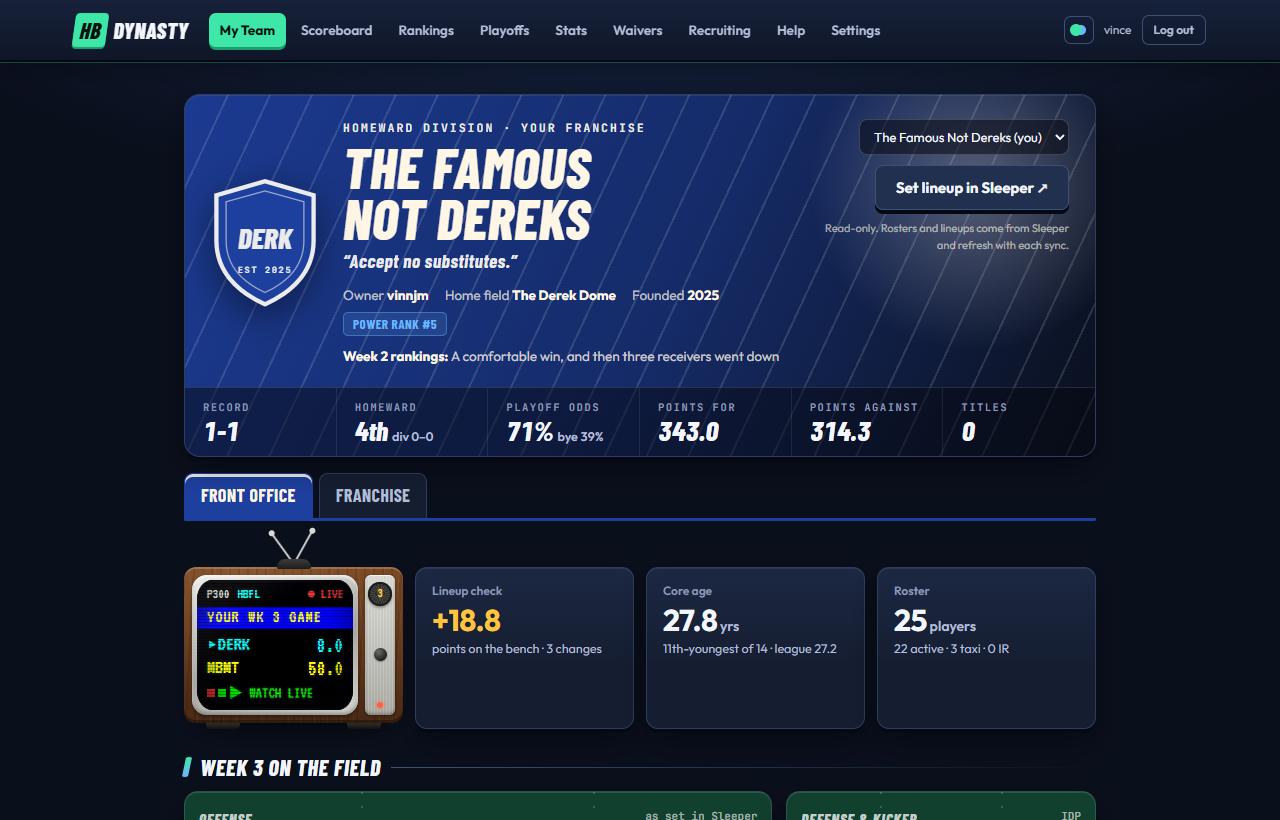
The Front Office: your masthead, then the matchup TV and the quick tiles.
On a phone
The Front Office is your landing page, about this week: the team dots, the title card (your crest, name, motto, owner, Power Poll rank and the record strip, with the My Team tabs along its bottom edge, the same on every My Team tab), then Week N Matchup, Your to-do, a card that changes through the week, the field and the sideline, Latest on your players and your Home stadium tile. The longer view (position rooms, the depth chart, age and draft capital, your history) is on the Franchise tab. The rest of the masthead (your division, this week's Power Poll headline, points for and against, titles) shows on a computer.
The masthead
The big header at the top is your team's masthead, painted in your team colors. It shows your crest, name, motto, owner, your Power Poll rank, and this week's headline from the Power Poll (your home field shows there on the Owner's Box, where you edit it). It's the same on every My Team tab. The strip near the bottom shows your record, division rank, playoff and bye odds, points for and against, and titles won, and under it the card's last row is the My Team tabs: Front Office, Franchise, Scouting and the Owner's Box.
If you've adopted a home stadium (see Set up your team), its stadium tile sits right under the masthead: an 8-bit snow globe of the stadium under the real weather there, headed by your home field's name, with the temperature and wind beside it. Tap Hourly forecast & stadium facts for the next few hours and a few facts about the place. The stands are empty until your matchup is live.
Look at another team: swipe the title card left or right (it follows your finger) to go to the next or previous team, on the same tab. On a computer use the ‹ › arrows above it. The dots above the card are the league's teams: yours is ringed, the one you're looking at is bigger, and tapping a dot jumps straight to that team. Front Office and Franchise work for every team; only your own has Scouting and the Owner's Box, so swiping from those lands on the other team's Franchise tab.
Go to Sleeper: on your own team, the Manage Team › button over the field opens your lineup, taxi squad and IR, with Open Sleeper ↗ inside (see below); on another team the masthead has Open in Sleeper ↗ and Trade with them.
The same score tile as the top of the matchup page: both teams in their colours with the score and projection, the chance to win with its chart over the week, and how many starters each side has still to play. Full matchup › under it opens the matchup page. In a week with no game, the little wood-paneled TV takes its place.
Your to-do
Only what needs you, most urgent first: a trade offer waiting on you, a starter who won't play (on bye, out, an empty spot), a better lineup than the one you've set (with the first change to make), an @mention in the league chat, on Tuesday and Wednesday the waiver claims worth making, and the Power Rankings once they're out. On game days it adds how many of your starters are still to play. Tap an item to act on it; when there's nothing, it says All set. Only on your own team.
The day card
Follows the fantasy week (Eastern time). Sunday and Monday: your starters' points so far, best first. Tuesday: last week's recap (the result, your best and worst starter, where your score ranked, the points left on your bench and the biggest start/sit miss). Wednesday: your top waiver claims with who to drop, from the Waiver Wire. Thursday to Saturday: when your starters kick off, grouped by kickoff time and then by game. Each game shows its TV network, betting line and over/under, and tapping it opens that game's page; tap a player for his card. Starters on the injury report are outlined in amber, and a note under the games lists them and, on your own team, opens the lineup editor. When a day has nothing to show, it shows the kickoffs.
Latest on your players
Everyone on your roster with an injury status (except players already in IR slots): your starters first, then whoever is ruled out, each with the status, what's wrong, and his latest update from the past week. Statuses come from Sleeper and refresh every hour; updates are RotoWire's, via ESPN, every two hours.
Week N on the field
Your starters drawn on a football field, lined up in formation: receivers wide, tight ends by the line, the quarterback and backs in the backfield, and a second field for the defense and kicker. Each player shows his headshot, slot and projection (the lighter number), with his kickoff under it. Once his game kicks off, his points this week take that spot in bold, outlined in green while the game is on, and on your own team a small lock on the headshot means he can't be moved any more. While games are on, the points, the line over the field and the matchup tile update by themselves every minute; no need to reload. Tags on the headshot say why a player may not play: BYE, Q, D, OUT or IR, and those players' photos are dimmed. Below the field is the sideline: bench (with this week's projections and points too), taxi squad (the rookie bench, where first- and second-year players don't score) and IR, each with its roster limit. On your own team, tap the green of either field, or any spot on a sideline card that isn't a player, to open your lineup in the app; tapping a player still opens his card. Save a change there and the page redraws when you close it.
Over the field, one line keeps the score: before kickoff your projected total and the first kickoff; once games start, your points so far, how many starters are still to play (and how many are playing now), and what they're projected to add.
If a starter won't score this week (on bye, out, on IR or suspended) or a starting spot is empty, an amber box above the field says so, one row each, with the best healthy bench player who can fill the spot. When a free agent is projected for clearly more than anyone on your bench, it names him too, with a link to add him in Sleeper. Tap the box to fix the lineup here, or Fix in Sleeper ↗ to go straight to your team on Sleeper while Sleeper's lineups are the ones that count.
Lineup check
The site builds the best lineup it can from your roster using Sleeper's projections (scored under HBFL rules). When it projects more than the lineup you've set, Your to-do says by how much and names the first change; tap it to open your lineup, where every spot a player can go shows what it adds. Taxi and IR players are never suggested, and neither is anyone projected for zero.
Tip
Check it Sunday morning after the inactives come out.
Managing your team in the app
The green Manage Team › button sits right above your team on the field, beside the "Week N on the field" heading. It opens your whole roster in a pop-up: your starters, then the bench, the taxi squad and IR, each with how full it is. The pop-up says whose lineup counts (Sleeper's, until the playoffs) and has Open Sleeper ↗ to make the changes there. Set lineup beside your team on the matchup page, the Scoreboard and the phone menu opens the same pop-up.
Tap a player and every row he can't go to fades out. The rows left lit are where he can go, each with what the move does to your projected score (swap when it's even). Tap one to move him there; if someone's in it, they trade places. Tap him again, or Cancel, to put him down. You can start from the other end too: tap an empty starting spot, or an open taxi or IR spot, and the players who can fill it light up. On a computer, pointing at a lit spot shows the new score and win odds in the strip at the top. Best lineup puts in the best projected lineup in one tap.
It saves as you go. Every change is kept straight away, and Undo takes back the last one.
Players whose game has started are locked (🔒): they stay where they are, in the lineup or on the bench.
It starts as your Sleeper lineup. Until you change something, the app shows whatever you've set in Sleeper. Once yours differs, a banner counts the slots that differ; Use my Sleeper lineup copies Sleeper's back.
Step through the weeks with the arrows to set a later week ahead of time.
Taxi and IR moves are made in Sleeper. Sleeper doesn't let other apps change your roster, so a move to or from the taxi squad or IR is planned here: the player shows in his new spot, marked Make it in Sleeper, and a banner lists the moves to make there. Once you've made them in Sleeper, they clear by themselves. A player you bring up from Taxi or IR can't start here until Sleeper has him back on your active roster.
Sleeper's rules apply: the taxi squad is for players in their first two seasons, IR for players listed IR or PUP, and each has a limit (so does the active roster). When one is full, swap someone out instead: tap a player and then the one he should replace.
For now, Sleeper's lineup counts
Until the playoffs, the lineup you set here is a practice one: the matchup is still scored from your Sleeper lineup. Use it to see how a change plays out, then make it in Sleeper. If the league moves the playoffs into the app, then from that week the pop-up says This lineup counts, the app keeps score from it, and My Team, the matchup page and the Scoreboard all show it. If you never set one in the app, your Sleeper lineup is the one that counts, and so does a lineup you change in Sleeper after setting yours here: whichever you set last counts. The pop-up says so when that happens, and a change here takes it back.
How each of your position groups stacks up against the other 13 teams. Each room adds up its best players' points per game over their last 17 games: 2 quarterbacks, 3 running backs, 3 receivers, 2 tight ends, 3 defenders and 1 kicker. A dot strip shows all 14 teams from weakest to strongest, with yours in blue, and your rank next to it.
Depth chart
One card per room with every player you have there: age, points per game over his last 17 games (L17), his hit rate (the share of this season's games that were worth starting in HBFL) and a week-by-week sparkline. Taxi and IR players are faded.
Age and production
A chart of your roster with age across the bottom and points per game up the side. Blue dots are starters, gray is the bench, orange is taxi or IR. The vertical line is the league's average core age. Young and high is where you want to be.
Draft capital
Your rookie picks for the next three drafts, after trades. Next year's picks show where they'd land if the season ended today (for example 1.05, or "bonus"). Picks you traded away are crossed out and show who has them now; picks you acquired say "via" the original team.
The Franchise tab is your team's history and identity. Every owner can open any team's Franchise tab by swiping the title card (or its arrows and dots), or from a team link on the Power Poll.
Schedule
Laid out like an NFL team's schedule. On top, the team's record and its home and away records, then the next game on the same card the Scoreboard uses: the week, date and whether it's a home or away game across the top, both teams with their records and projections (scores once it's under way, with who's playing and yet to play), and the chance to win. Your own team is tagged YOU. Tap it to open the matchup.
Full schedule unfolds every week: the date, vs or @, the opponent, where it's played (DIV marks a division game), and the result with both scores, or for a game still to come, the opponent's record. This week's row is lit. All, Home and Away filter it. The playoffs follow (your odds of making them until the bracket's set), then, when Bowl Week is on, your rivalry bowl. A * marks a game at the visitor's stadium because the home team hasn't picked one. Tap any week to open its matchup.
Season charts
Once a week is final, the Franchise tab shows how this team's season is going, in its colours:
Record with the all-play record (every week's score against all 13 other teams), luck (wins minus the wins all-play expects), points left on the bench with lineup efficiency, and how much of the team's points came from its top three scorers.
Week by week: the team's score, the best lineup it could have set above it (dashed), the opponent's score as a line, and the league median.
Start/sit misses: the weeks a bench player would have scored 5 or more points more in a starter's slot, biggest first.
Points a game by position against the league average.
The Franchise tab is your team's long view, split into three parts by the buttons under the tabs: Season (the schedule and the season charts), Roster (your core age and roster count, then the position rooms, depth chart, age and production and draft capital, described under My Team) and Legacy (the trophy case, the transaction log, rivalries and franchise firsts). The address keeps the part, so a link opens the same one.
Transaction Log
This team's adds, drops, claims and trades, straight from Sleeper. Full wire → opens the League Wire filtered to this team.
Trophy case and banners
Trophies won, by year, each with the draft pick it earned: League Champion (pick 2.01), Runner-up (2.16, the last pick of round 2), Third Place (3.15, the last pick of round 3), Consolation Champion (1.01), Division Champion, Division Runner-up and Division 3rd Place. Empty dashed trophies show what's still up for grabs this season and when it's decided. Tap any trophy to open its page in the Trophy Room, with everyone who's ever won it; Trophy Room › beside the heading opens the whole room.
Banners hang for the year the franchise was founded, division titles and playoff trips.
Rivalries
Every series this team has played, all-time. The featured rivalry at the top is your rival: every team's is set by the commissioner and doesn't change (it shows as Rivals until someone names the game). A team without one features the series it has played most (a division rival wins ties). It shows the record, the last meeting and when you play next. All series opens the full list.
Name it
Give your rivalry's game a name in the Owner's Box, like "The Derek-Derrick Bowl". Either owner can name or rename it (who your rival is stays fixed), and the name shows on the matchup page whenever the two teams meet.
Franchise Firsts
Your first game, first win, franchise-high score and first playoff game, plus any entries this team holds in the league's record book of firsts.
The Owner's Box
The Owner's Box, where you set your name, colors, abbreviation, motto, home field, home stadium and rivalry names, has its own tab next to this one, on your own team only. See Set up your team.
The Trophy Room holds every trophy the league hands out. Each one shows who holds it now, and tapping it opens its own page listing everyone who's ever won it.
The trophies
League trophies
Decided in Week 17: the League Championship Trophy (gold), the League Runner-up Trophy (silver, for the other finalist), the Third Place Trophy (bronze, from the Third Place Game between the Division Final losers) and the Consolation Cup (the Consolation Final's winner, who also gets pick 1.01).
Division trophies
Decided in Week 16, three for each division: its Division Championship (the Division Final's winner), Division Runner-up (its loser) and Division Third Place (the winner of that division's 3rd Place Game).
Rivalry bowl trophies
One for each rivalry, won in Bowl Week (Week 18), and they travel: the latest bowl winner keeps it for a year. Some are drawn in 8-bit after the real thing: the Land-Grant Trophy's walnut column and the Yocco's Hot Dog Bowl's billboard, each with its winners engraved on brass plates.
League trophies are tall cups and division trophies are shields on a stand. A trophy nobody has won yet is drawn as a dashed outline.
A trophy's page
The trophy, what it's won for, and who won it last. Every winner lists each year's winner and who they beat, with the deciding game's score. Tap the score to open that matchup. Most wins shows who has won it more than once.
Names
Every trophy starts with a plain name. The commissioner can give one a proper name (say, "The Homeward Cup"), and the new name shows everywhere.
On your Franchise tab
Your trophy case on the Franchise tab's Legacy part shows the trophies your team has won. Each one opens its page here.
The Scouting tab turns the Recruiting Hub toward your own roster. The Big Board ranks college prospects the same way for everyone. This tab asks which of them matter to your team, and points out players you might never have looked at.
It's on your own team only, next to the Owner's Box. Nobody else can open it. Other owners can see how many people starred a prospect (“2 watching” on the Big Board), never who.
Following
At the top: the players you follow (from a player card's + Follow) and the prospects you starred, each with his injury status, who holds him in HBFL, his last game line and points, and his latest news. Five show; the rest open under All. Tap a player to change what you hear about him. Only you can see it.
What you need
Your roster is aged a season at a time, and so is everyone else's. No trades, waiver pickups or rookies are added, so it shows where things are headed if nothing changes. A position room becomes a need once it falls out of the league's top 5. The chips read like WR now or RB from 2028.
Running backs fade first (a player loses 18% a season after 26), then tight ends (14% after 29), receivers (12% after 28) and quarterbacks (10% after 32). Nobody plays at 38.
Your picks
For the next draft, each pick shows the range where it usually lands, like 1.07–1.15. It's a range because the standings still move every week. Where your picks come from Sleeper's traded picks, the tab uses those. For the class after that, it shows which picks you hold, since their order isn't known yet.
Worth a look
Prospects you haven't starred who fit your needs. For the next draft there are two per pick, each at the latest pick where he's likely still there, so you know how long you can wait. Each card gives three reasons in plain words:
The need
How the room he'd join looks, like “Your running backs slip to 7th by 2028”.
Likely, Possible or Long shot
How likely he is to make your starting lineup by his third season. Rookies rarely start right away, so the third season is the fair test.
Likely there, Toss-up or Needs a trade-up
How often he's still on the board at your pick.
Worth a trade-up names the best fit among the players likely gone before you pick.
Your stars
Every prospect you starred on the Big Board, measured against your roster the same way. When a similar player at the same position fits you better, because he's more productive or more often there at your pick, the tab suggests him: Also look at…
Tip
When your recruits play on Saturday, a link at the top takes you to the Saturday watch guide.
Show the math
Tick Show the math to see the numbers behind the words. The site remembers your choice on that device.
Forecast: points per game for his first three NFL seasons, taken from how real rookies scored under this league's rules in the 2023–2025 classes. The careful forecast treats him as if he ranked twice as low at his position in his class. The ceiling takes his rank as it is.
To beat: the player he'd have to pass on your roster that season (the last player your room counts), after aging.
Chance he gets there: how many rookies a class pass that player by their third season, against where he's forecast to rank. The chances are 45% and up for Likely, 20% for Possible.
On the board at your pick: the next rookie draft played 300 times. The standings shuffle by how much season is left, the bonus picks go to likely teams, and every owner takes the best Board Value left, nudged toward his own thinnest rooms.
Keep it in perspective
College production is only part of the story. NFL draft capital and landing spot decide most rookie values, and neither exists until the NFL draft in late April. Defenders aren't forecast yet. Read the tab as a list of names worth watching, not a verdict.
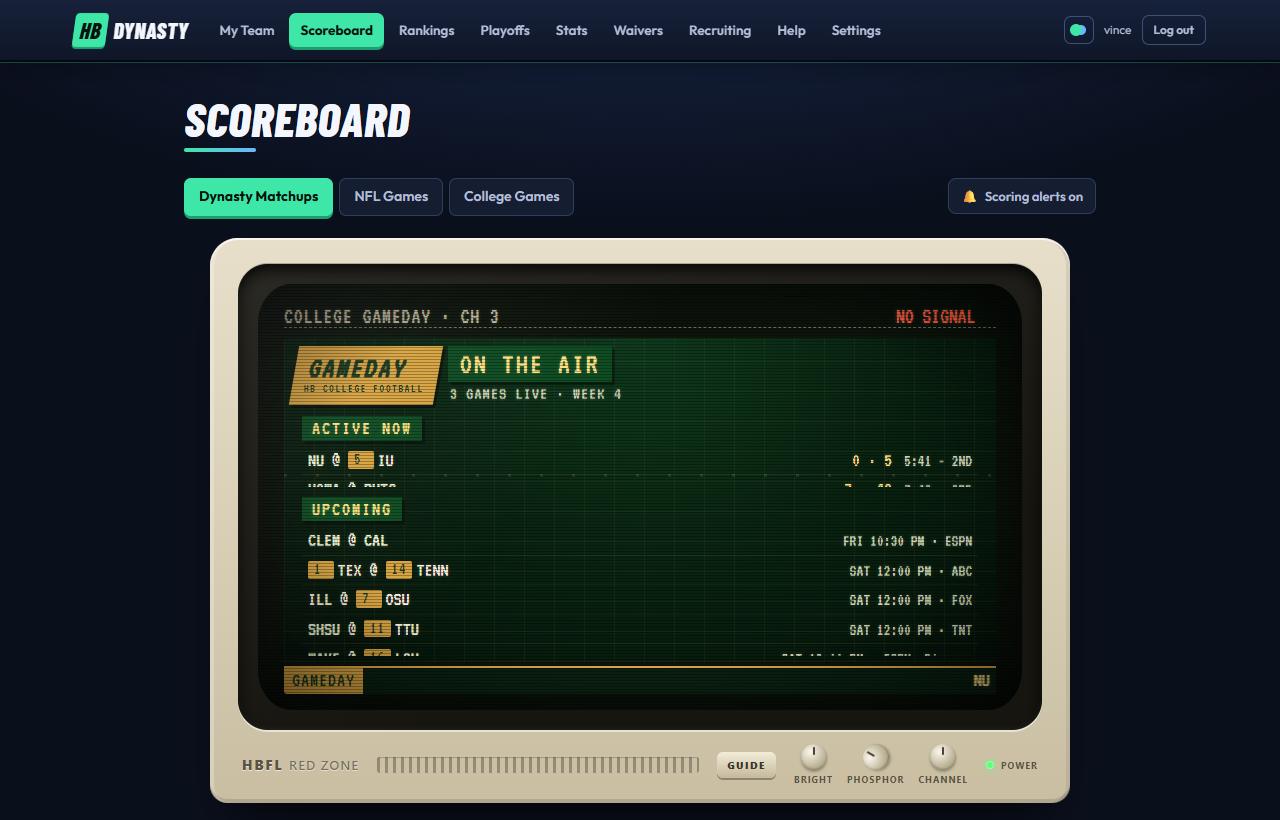
The Scoreboard: three tabs, the TV, then this week's games.
Three tabs, one TV
The Scoreboard has three tabs: Dynasty Matchups (the league's games), NFL Games and College Games. The TV sits above all three, with a TV ON / TV OFF switch on the line above it (with the channel it's on): off hides the TV and the scores move up; on brings it back. This browser remembers which. Pick a week from the Week menu at the right of the Scoreboard title. Switching tabs, weeks or filters changes the list without reloading the page, so the TV keeps playing.
On a phone the TV is shown small, to watch. Tap it to open it full size over the page, with the channel knob, the guide and the rest of the set working; Minimize puts it back.
The Scoreboard link opens Dynasty Matchups for this week, unless college is the only thing on (a Saturday with no NFL game, for example), when it opens College Games.
Live updates
While games on your tab are live, the list refreshes itself every 30 seconds. Scores that changed flash green, and on Dynasty cards a small "+3.4" shows how much a team just gained. The header says when it last updated. If live data falls behind, an amber "Scores may be delayed" or red "Live updates paused" note appears.
Dynasty Matchups
Pick a week from the Week menu at the right of the title. Your own game comes first, under Your Matchup, then the Game of the Week, then any rivalry games, then the rest. A game where both teams are finished for the week drops to the bottom, yours included, so the games still being played stay on top. Each card shows:
Both teams in their colors, with records. Division games are tagged.
The score and each team's projection (before kickoff, just the projection, like "~121").
While live: how many starters are playing, yet to play or done.
While games are on, a drawer opens under the card with each team's starters on the field right now: the top team's down the left and the bottom team's down the right, each with position, NFL team, game clock and points so far, best first, and under it the stat line behind the points ("20/38, 271 yd, 2 TD"). Tap one for his player card. The drawer closes when neither team has anyone playing.
A win-probability bar in the two teams' colors, with each team's chance at its end (the favorite in bold).
Tags under the score: ★ Game of the Week (one game a week, shown right after your own), the rivalry's name if its owners gave it one (⚔, set on the Owner's Box), the series record once the two teams have met, and Division game. The Game of the Week is picked from what's known before kickoff, so it holds all week: how much both teams' playoff odds are at stake, how evenly matched they are, a named rivalry, a division game, and anything the game can clinch. In the playoffs it's the biggest round.
Record watch: a starred line when a team's score makes the top three weeks in HBFL history (how records work).
What's at stake, in the last weeks of the season: "clinches a first-round bye with a win", "is eliminated from the playoffs with a loss". These only appear when they're certain. Playoff games say what the round is for, such as "winner takes pick 1.01".
Every NFL game that week: the games on now first, under On now, then the rest under a heading for each kickoff time (TNF, SNF and MNF marked). Each game is a slim row, like a sports app's scores list: a line per club (its logo, abbreviation and record, a gold ★ count of your starters on it, and its score once it starts), and at the right the kickoff time or the clock (FINAL in green once it's over), the TV network, and before kickoff the betting line and the over/under. Under them, the stadium (rain, snow or strong wind gets an amber flag) and how many HBFL starters are in the game. The full weather and the top scorers are on the game page.
★ My players shows only games with your starters in them.
Tap anywhere else on a game to open its game page with play-by-play.
College Games
This week's FBS games, grouped as Active now, Upcoming and Final. The Week menu at the top goes back to earlier weeks of the season; tap any game there to open its page and replay its plays. Each game is the same slim row as on NFL Games: the schools with their AP ranks and scores, the clock or kickoff and the TV network at the right, and under them up to three top prospects playing. Filters: Top 25, Power 4, ★ Top 100 Recruits (a Big Board top-100 prospect is on the field) and a conference dropdown. ▶ Watch sends a live game to College Gameday on the TV.
Scoring alerts
The bell beside the tabs pops up a note whenever one of your starters scores. See Scoring alerts.
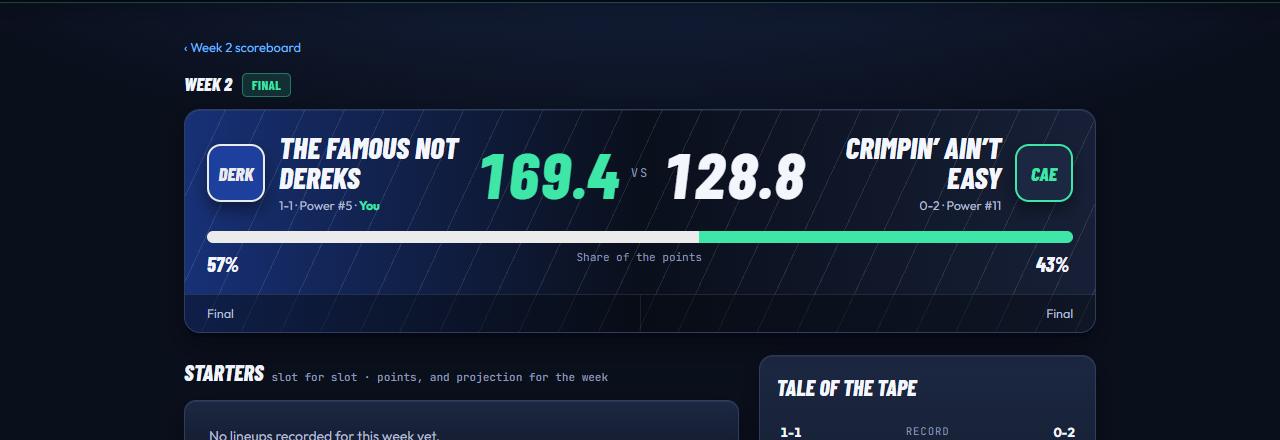
The matchup page: win probability, lineups slot for slot, still to play, tale of the tape, benches.
Open any HBFL game from the Scoreboard or from the TV on My Team.
The matchup header, painted in both teams' colors.
The header
Both teams in their franchise colors: crest, name, record and Power Poll rank, with "You" on your side. Big scores with each side's projection underneath. Below them:
Chance to win: a bar with each side's percentage. After the game it becomes "Share of the points".
⚡ Clutch: when a live game is down to its last player or two and the side behind can still win it (within two big plays), a red strip names who it comes down to and what's needed ("Holly's Winning Team needs 2.47 to win"), and that player's row in the lineup says needs 2.47 to win. With one player left on each side it reads as a duel. The same line shows on the game's Scoreboard card.
A thin trend line showing how the win probability moved while games were on (the dashed line is 50%). The quiet time between game days is skipped: a short dashed gap marks the jump, labelled with the next day (SUN, MON). Tap any point on it for a reading there: the time, both teams' chances and the score then; tap it again or anywhere else to let it go (with a mouse, hover; with the keyboard, the arrow keys step along it). The same chart is on My Team's matchup tile.
How many starters each side has playing, yet to play and done.
If an owner has adopted a home stadium (see Set up your team), the game is played there: the stadium tile (an 8-bit snow globe of it under the real weather there, the temperature and wind, and a folded Hourly forecast & stadium facts section) sits under the header, headed by the host's home field name. Sleeper has no home team, so the site sets one for every game: over the regular season each team hosts half its games (6 or 7 of 13), in the playoffs the better-placed team hosts, and in Bowl Week the trophy's holder does. If the home team hasn't adopted a stadium but the visitor has, the game is played at the visitor's, and the tile says so. The League Championship is the HBFL Bowl, played at the venue the commissioner picks, with HBFL on the video board (see Playoffs).
When it's the Game of the Week or a rivalry game, a card under the header makes the case before it's played: a few sentences on why it matters, both teams' records, Power Poll ranks, points per game and playoff odds side by side, and what the Power Poll said about each. Share this game sends the link, and when it's pasted into a text or group chat its preview says the same: a ★ Game of the Week or rivalry flag with the numbers.
Under the header you'll see whether it's the week's Game of the Week, what's at stake (late in the season or in the playoffs) and the rivalry: its name if the owners gave it one, the series record, and when they last met.
Starters, slot for slot
The two lineups are paired by position: quarterback against quarterback, flex against flex, and so on. Each player shows his NFL team, opponent and game status, and his points against his projection ("12.4 of 18.7") with a small meter. The higher scorer in each pair is in green. Once a player has played, his stat line sits under his name (yards, receptions, touchdowns, first downs as "1D", tackles and the like), so you can see where the points came from.
On your own game, before it's final, the green Manage Team › button sits right above the list: it opens your lineup, taxi squad and IR in a pop-up, with Open Sleeper ↗ inside (Sleeper's lineup counts until the playoffs).
A quarterback, receiver, tight end or kicker whose game has rain, snow, 15+ mph wind or 28+ mph gusts forecast gets it in amber after his game (· wind 18 mph or · gusts 37 mph): in those games they've scored about 5–10% below their form since 2019. Hover it for the reason. It goes once the game starts.
A starter whose week makes the HBFL record book gets a ★ after his game: ★ HBFL record, ★ 2nd-best HBFL week, or at his position, ★ WR record.
Record watch
When a team's score makes the top three weeks in HBFL history, a starred note under the header says so: "The Sharks' 233.56 is a new HBFL record for points in a week (was 231.45, 2026 Week 1)". While games are on it reads "so far would be", since points only go up. The same goes for a starter's week, among every HBFL starter and among starters at his position. The record book starts with 2026, the league's first season, and only ranks a list once it has at least ten weeks in it, so an early or thin list doesn't call out every game.
Good to know
Sleeper doesn't say which slot each starter filled, so the site places them itself. Totals can occasionally differ from Sleeper's by a hair; Sleeper's score is official.
Benches
Under the starters, the rest of both rosters in the same side-by-side table: the Bench first, then the Taxi squad and IR, each with how many players each side has there. Each side's players are listed best first, a row for every spot (ten on the bench), with their points, projection and game like the starters. A dash is an open spot. The bench's total is at the foot of its part; taxi and IR points don't count toward anything, so those parts are a little faded. Once the week is over, a note under the table says what a team left on its bench ("left N on the bench: start X over Y"), counting the bench only: a taxi or IR player couldn't have started.
The side panels
Still to play
Projected points each side still has coming, and from whom.
Live games
Links to the NFL games this matchup's starters are playing in.
Tale of the tape
Record, points per game, Power rank, playoff odds and head-to-head, with the better number in green.
While the game is live the page refreshes itself every 30 seconds.
The GameCast play-by-play TV, box score, team stats and rosters.
NFL game pages
Tap any game on the NFL Games tab. At the top is the scorecard, the same card as on the NFL Games tab: a Red Zone bar with the TV network, the line and the over/under (LIVE or FINAL once it starts), both clubs face to face on their colours with their records and scores, the score by quarter, and the stadium with the weather. Tap a club's logo (here, or above its table or leaders below) to open its club card. Every player's name has his headshot beside it; tap either for his player card. Below it are five tabs, set out like ESPN's game pages: Gamecast, Box Score, Team Stats, Fantasy and Rosters. A tab has its own link, so you can send someone straight to a box score. The page refreshes itself every 30 seconds while the game is live.
The GameCast TV
Below it, a TV called the HBFL GameCast-80 replays the game one play at a time, shot like a TV broadcast from the press box: 8-bit players in their teams' uniforms run the play on a field that fills the screen, with the stands, the wall and the home bench across the far sideline, the visitors' bench and the chain crew (at the line and the first-down marker) on the near one. The players stand set before the snap, run with their legs going, and the ball carrier is outlined in yellow. Each play comes up as closed captions along the bottom of the picture, white on black like an old TV's, and headlines flash up like "TOUCHDOWN!!" or "FLAG!". Once the play is in, a yellow caption line shows any HBFL player involved and what the play was worth to him. On the field, the players the play names wear small name labels that move with them; an HBFL player's is highlighted and adds his points (like +6.2) when the play ends.
During the game the replays work from the play-by-play text, which only says roughly where a pass went, so the X's and O's are a best guess. By the next morning the replays pick up charted detail on each play: where the ball was really caught, which hash it was snapped from, play action, screens, blitzes and throwaways. Replays later in the week, and the HBSN2 Top 25, show the play closer to how it happened.
The keys on the front of the set:
◄◄ PREV / NEXT ►►
Step through the plays. On a computer, the ← and → keys do the same once you've clicked the screen, and Space replays.
► PLAY
Replay the current play.
AUTO
Play through the whole game.
LIVE
During a live game, jump to each new play as it happens.
?
A note on what the field shows (and doesn't).
The red counter shows which play is on (12/148). Under the set, a printer feeds out the play-by-play on old green-striped computer paper, a short stretch of it curling away into a roll: every play with its quarter, clock, down and spot, the result (TOUCHDOWN!!, FLAG!) and ★ points for HBFL players, newest at the top by the slot, a torn perforation between quarters, a header as each drive starts ("SEA DRIVE 4 · FROM SEA 25") and its summary once it ends ("SEA DRIVE 4: 9 PLAYS, 75 YDS, 4:32 -- TOUCHDOWN (+7)"). Scroll the paper to read back; the play on the screen is highlighted in yellow, and tapping any play shows it.
The field keeps the drive in view, like a drive tracker: under the formation, a dotted line runs from where the drive's first play started (a tick) through a point where each play since ended, older stretches fainter, a penalty's point in amber. Step on with NEXT, AUTO or LIVE and the players walk up from where the last play left them to the new line while the camera follows. A new drive starts with a clean field.
On the screen, under the score in the top corner, is the drive the play belongs to as it stood after that play: its plays and yards so far and where the ball is, with a bar from where the drive started to the ball. Once the drive is over it shows the time it took and how it ended.
Drives
Under the set, the Drives card: for each team, its drives, points per drive, plays and yards per drive, three-and-outs, red zone trips that ended in a touchdown ("1/3") and turnovers. Then every drive in order: the quarter and clock it started, its plays, yards and time, where it started, and how it ended (touchdown in green, field goal in amber, a turnover, a turnover on downs or a missed kick in red), with a bar for the yards. The drive going on during a live game says ON NOW. Drives are ESPN's, and the numbers are worked out from the plays.
Gameday
Under the TV, the Gameday tile (on every NFL game, and on college games played in a stadium we've drawn, such as Penn State's Beaver Stadium, Rutgers' SHI Stadium and Michigan's Big House), headed by the stadium's name, is the stadium in a little snow globe whose sky is the real weather there: sun, drifting clouds, a grey overcast, rain, snow, fog or a thunderstorm with lightning, day or night as it is in that city. While the game is on, the stands are full: the fans move, and now and then they start a wave. Before and after, Now shows the stadium with its seats empty; Kickoff fills them. Beside it: the temperature, sky and wind. Before kickoff, Kickoff shows the forecast for the opening kick (and the globe as it should look then); Now shows the weather this minute. Tap Hourly forecast & stadium facts to open the rest: the hours of the game, each with its chance of rain, and a few facts about the stadium (when it opened, how many it holds, grass or turf, and its roof). It starts folded so the tile stays the same size on every game. Full forecast on HBWX ↗ opens our weather app on the stadium's town, with the radar and the week ahead.
Before kickoff, a game with rain, snow, 15+ mph wind or 28+ mph gusts forecast gets an amber Weather watch line above the tile: since 2019 quarterbacks, receivers, tight ends and kickers have scored about 5–10% below their form in games like it, while running backs and defenses barely move. Other weather doesn't get one: it hasn't measurably moved points.
Under the TV on the Gamecast tab: the scoring summary (every score by quarter, with the running score), the fantasy leaders (each side's top three scorers and their lines, with a ★ when an HBFL starter's week makes the record book), and game info (kickoff, stadium, TV and the betting line).
Box Score
Passing, Rushing, Receiving, Defense and Kicking tables for each team, with a TEAM total row, the way ESPN lays them out. The last column, FPTS, is each player's fantasy points for the whole game in HBFL scoring, so a player in two tables shows the same total in both. A tag names the HBFL team that has him (solid for started, outlined for benched). Tap a name for the player card.
Team Stats
The two teams side by side, with a bar for each stat: total, passing and rushing yards, yards per pass and per rush, touchdowns, turnovers, sacks, tackles for loss, takeaways, and the fantasy points the whole team scored. They're added up from the players' box-score lines, so passing yards don't take off sack yardage.
Fantasy
Every fantasy-relevant player in the game, paired position by position, with his points. A tag names the HBFL team that has him, and your own players' names are highlighted.
Rosters
Each club's roster today at the fantasy positions, by Offense, Defense and Special teams: number, age, years in the league (R is a rookie), games played, season points, points per game and points in this game, with the HBFL team that has each player. Switch teams with the buttons at the top.
College game pages
Tap a college game on the College Games tab. It has the same scorecard and tabs, minus Fantasy: the scorecard's bar says GAMEDAY, and each school shows its AP rank and record in its colours (no betting line or weather there). The college GameCast TV is the same set, with the same keys, paper, drive line, Drives card and drive chart on the field, and ★ marks top-100 Big Board prospects. The Box Score and Team Stats count every player at a fantasy position on an FBS roster, so kickers and players from non-FBS schools are left out. Rosters lists each school's players with their number, ESPN position, class, height and weight, season and game points, and #N for a Big Board rank. A name opens the prospect's page.
The Power Poll page is where the poll is published every Tuesday. At the top you'll find the week's write-up (… Keep reading opens the rest), arrows to browse earlier weeks, and a teletext TV that rolls slowly down the whole poll, then pans across to each division's seeding (with the bye, wildcard and consolation spots) before coming back round to the poll.
Under it, the HBSN crawl scrolls the week's biggest movers, win streaks and unbeaten teams. Four tiles pick out the Biggest riser, Biggest drop, the Top score of the week, and Poll vs standings, the team whose poll rank and division seed disagree most. Tap a tile to jump to that team.
On a phone, the top is an HBSN title card: the red HBSN bar, the small teletext TV beside the title, and the week as amber tags. The story ▾ shows the write-up's first line; tap it for the rest and the four tiles. The crawl and the week arrows sit in the card. The poll reads like a stadium board: each tier under a teletext bar, the place in amber, and the record and division seed under the name.
The toolbar
The bar that sticks to the top as you scroll has jump chips: ★ You (your team), each tier, Standings › and the Report card. Expand all opens every row.
Keyboard shortcuts
On a computer, press ? to see them: ←→ previous or next poll, M my team, E expand all, G report card.
The division standings are on the Playoffs page, where they seed the bracket. The Power Poll article covers the poll itself.
Every Tuesday, after Monday Night Football, the league publishes a Power Poll: all 14 teams ranked by where their roster stands right now, with a short write-up for each. It's not a prediction of the final standings. It reads Sleeper rosters, the week's NFL news and HBFL scoring (Superflex, first-down bonuses, IDP).
Tiers
Tier 1
Championship Favorites
Tier 2
Real Contenders
Tier 3
Playoff Bubble
Tier 4
Structural Holes
Tier 5
The Long Game
Reading a row
Rank and movement: ▲ or ▼ how many places since the last poll.
A chip with the team's division, seed and slot, like "BOU #2 · BYE".
Grades for QB, RB, WR, TE and IDP, from A+ down to F, colored green to red. Grades compare each room with the other 13 teams. IDP is graded against what's on the waiver wire, so a low IDP grade usually means "make a pickup".
A small rank trail showing the team's rank in every poll this season.
Tap a row for the write-up and the team's contention window: Contend Now, Contend Soon, Wait and See, Win-Now Worry-Later, or Rebuild.
The Position Report Card
Every team's five grades in one table, with a GPA (A+ counts 4.3, F counts 0). Tap a column header to sort by that position; tap # to go back to poll order.
Earlier weeks
Use the ◀ ▶ arrows (or the ← → keys) at the top of the page to read any earlier poll. At the bottom, How the power rankings work explains the method in full.
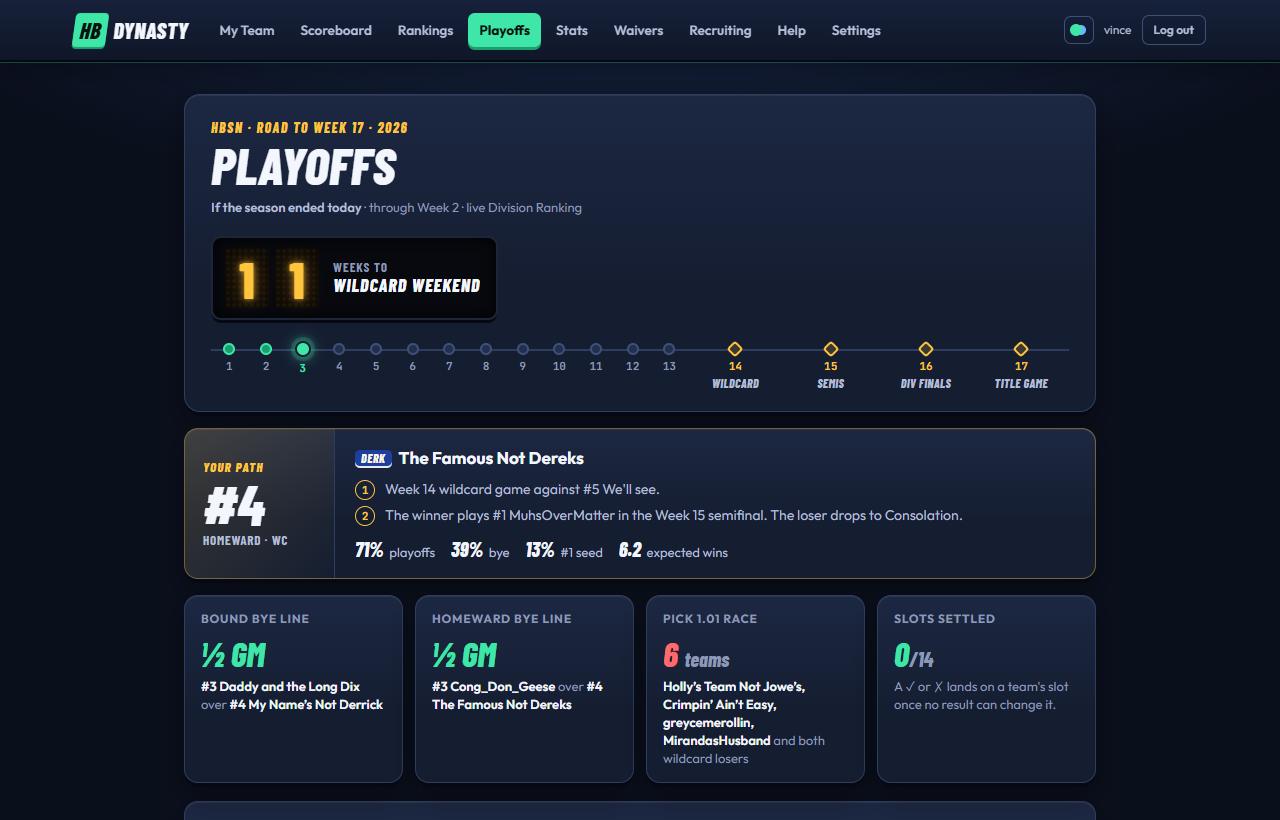
The top of the Playoffs page: the countdown, the road to Week 17 and your path.
If the season ended today
Everything on this page is drawn from today's standings. The top shows a countdown to Wildcard Weekend and a 17-stop road: finished weeks are filled in, this week glows, and the four playoff weeks are diamonds.
New to the format? Postseason guide › (in the page's links, and under the standings on a phone) opens the league's four-page guide: the standings, both brackets, the rivalry bowls and every prize, and why it's set up the way it is.
On a phone
The page comes in tabs under Your Path, pinned as you scroll: Standings and Playoffs (the bracket), and in Week 18 Bowls (see Bowl Week). The page's title names the tab you're on. It opens on Playoffs during the playoffs and on Standings before them, and remembers the tab you pick while you're on the site. Projection Mode sits on the Playoffs tab.
The standings
On a phone the Standings tab is laid out like the NFL's standings page: one table per division, in seed order, ranked with the league's real tiebreakers. A dashed gold line marks the Bye line (after seed 3) and a dashed red one the Wildcard line (after seed 5); the strip under each division's name says how far apart each line's two teams are. Each row shows:
The seed, the team, and under its name its last three results and its slot: BYE, WC or CONS, with a ✓ or ✗ once no result can change it.
W-L, the overall record, and Div, the division record, which is what ranks the table. That's why a 3-2 team can sit above a 4-1 team.
PF, points for, and Odds, the chance of making the bracket with this week's change. See how the odds work.
Tap a team to read why it's where it is (a clinch, or how a tie was broken) and its bye odds. On a computer the page shows the race tiles, the odds board and the seed lists instead.
Your path
For owners, in your team's colours: your current seed and slot, then your road in plain words, such as "Week 14 wildcard game against #5 We'll see. The winner plays #1 in the Week 15 semifinal." Under that, your odds of making the playoffs, getting a bye and the #1 seed, and your expected wins.
Race tiles
On a computer (on a phone, the bye and wildcard gaps sit in the standings):
Bye line
One per division: how far #3 is ahead of #4 in division games ("1½ GM", or "Level"). Tap it to jump to the chasing team.
Pick 1.01 race
The six teams that would play for the first pick in the consolation bracket.
Slots settled
How many of the 14 teams have a slot no result can change. A ✓ or ✗ appears on those teams.
Playoff odds
On a computer, a board per division, sorted by playoff chance. Each bar splits into bye (seeds 1–3), wildcard (4–5) and consolation (6–7). How the odds are worked out.
Seeds
On a computer, both divisions ranked 1 to 7, with the bye and wildcard lines. Notes under a team explain clinches ("Bye clinched in Week 11"), eliminations and how a tie was broken ("behind X on points for"). Clinches only switch on once they're certain, so they can appear a little late but never early.
The brackets
The championship bracket is drawn mirrored: one division on each side, the League Championship and 3rd Place Game in the middle. The consolation bracket sits below it. Hover a game to light its path. Tap any game to open it:
The two teams (or who they'll be), the week and dates, and the score once it's played.
Where it's played: the stadium tile, the stadium under its real weather. The League Championship is the HBFL Bowl, with HBFL on the board, at the venue the commissioner picks on Settings (if they don't, the defending champion's home stadium, and Arrowhead before anyone has won one). Every other game is at a host's home stadium, the same way as the matchup page: hosting takes turns week to week.
The season series between them.
At stake: what the winner and loser each go on to, with buttons to follow either path.
Every game has its own link, so you can send someone straight to it. On phones, the bracket runs left to right a week at a time: each division's byes and Wildcard lead into its semifinals, its final and the League Championship, with the Consolation bracket below. Each division's games are labelled by week: Wildcard (Week 14), Divisional Play (Week 15) and Divisional Series (Week 16). The 3rd place games sit, smaller, under the game whose losers they take: each division's under its Divisional Series game in Week 16, the league's under the Championship in Week 17. Lines join every game to the one its winner plays next, and turn green once a winner has gone through. Swipe sideways for the next week (you can see the start of it at the right edge), or tap a week's tab.
Bowl Week
When Bowl Week is on, the bowls follow the bracket: a program for each rivalry bowl, yours first.
Draft order
The three-round rookie draft as it would be today is on the Recruiting Hub's Draft Order tab; the Draft order › link here takes you there.
Play out a what-if
Press Projection Mode to drag teams around and pick winners, and watch the brackets follow. See Projection Mode.
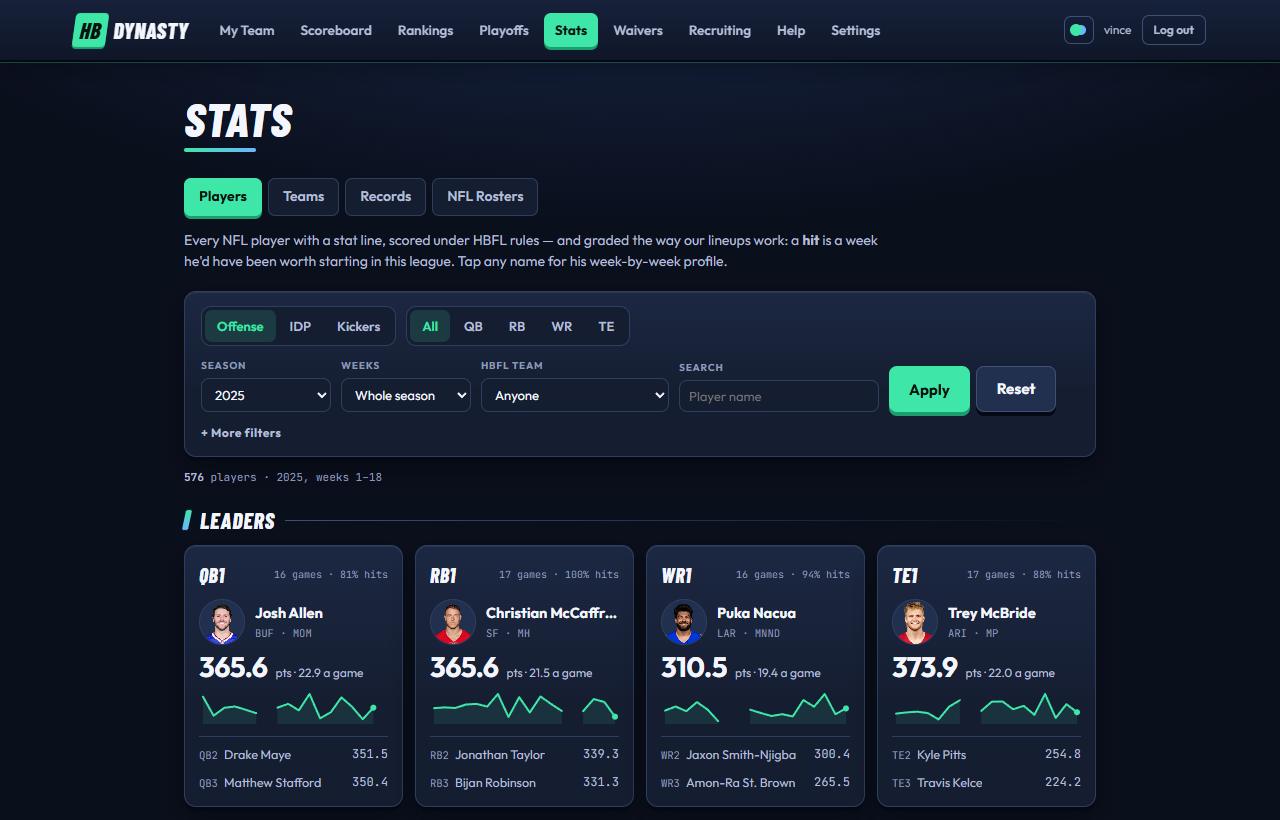
Stats opens on Players: filters, then the leaders at each position.
Stats has four tabs: Players, Teams, Records and NFL Rosters. Every number is scored under HBFL rules.
Players
Filters
Offense / IDP / Kickers, then a position.
Season and Weeks: the whole season, the last 4 weeks, or a single week.
HBFL team: anyone, my team, free agents, any roster, or one team.
Search suggests names as you type.
+ More filters: NFL team, college and years of experience (for example, rookies only).
Each choice applies as you make it, without reloading the page or moving you back to the top (type a name and press Enter to search). Reset clears them all.
What a "hit" is
A hit is a week when a player scored well enough to be worth starting in this league. The bar is the top 20 quarterbacks, top 36 running backs and receivers, top 14 tight ends and kickers, and top 28 defenders that week (DL, LB and DB are ranked together because they share the IDP slots). An elite week is the top 5 QB, top 6 RB/WR, top 3 TE/K or top 7 IDP.
The charts
Leaders
The top three at each position, with points, points per game, hit rate and a sparkline.
Week by week
The top 20 players with every week colored Elite, Starter, Bench or No game.
Heating up, cooling off
The top 60 scorers: season average across, last-3-games average up. Above the line is heating up.
Age and production
The top 200 scorers by age and points per game. The shaded corner is "Young and producing": 25 or under and above the median.
Every player
The full table, with weekly sparklines. Tap a column header to sort. Besides the usual stats you'll find Start% (how often his HBFL team started him), Hit%, Elite weeks, Trend (last 3 games against his average) and target and rush shares.
Teams
The Teams tab opens on five charts about how each franchise's season is going, counted from the regular-season weeks that are final. Every team is drawn as its badge in its colours (or its logo, if the owner set one in the Owner's Box). Hover over a badge, bar or cell for its numbers, or tap it on a phone (tap anywhere else to close them). The charts never take you off the page.
Luck
Points for across, points against up, with the league medians dashed. Bottom right is "good and lucky", top right "good but snakebitten". The table beside it has each team's all-play record: what it would be if it played all 13 other teams every week (scoring more than 10 of them in a week is 10-3). Luck is real wins minus the wins the all-play record expects: +1.5 means a team has a win and a half more than its scoring earned.
Points left on the bench
Each week, the best lineup a team could have set from the players it had (not the rookie bench or IR), minus what its starters scored. Lineup efficiency is the share of the best it got, and each team's worst week is named.
Contender or rebuilder
Core age (the average age of a team's best players, as on My Team) across, and points per game or the roster's trade value up. Young and scoring is "built to last", older and scoring is "win now".
Weekly finishes
Where each team's score ranked among the 14 every week, darker for higher, with the average.
Where the points come from
Each team's starters' points split by position: QB, RB, WR, TE, K and IDP.
Under the charts is the stat table: each franchise's starters for one week, added up: points, touchdowns, passing, rushing, receiving, IDP and kicking. Pick a week from the dropdown, or season totals to add up every week so far, with games played and points per game. Tap a header to sort.
Records and firsts
Records lists the top 5 in each category (fantasy points, touchdowns, passing, rushing, receiving, defense, kicking, and Lowlights, the records nobody wants: turnovers, interceptions thrown, fumbles lost, missed kicks, points left on the bench, points against and the fewest points) all-time, for a single season, or for a single week. Each team shows with its badge and a bar in its colours, measured against the record, so you can see how close the chasers are. See all 14 teams under a card lists every franchise (for a single season or week, each team's best), and Top 5 folds it back. My Team (beside the scope buttons) lights up your team in every card and fades the rest; where you're outside the top 5, your row shows underneath with your real place. It stays on in this browser until you turn it off. Records belong to whoever started those players.
At the bottom, Most traveled: the ten players who've been on the most HBFL teams since the league moved to Sleeper in 2026, each with the teams' tags in the order he played for them. Tap a player for his whole history on his player card (the Bio tab).
The league also keeps a record book of firsts: the first touchdown by an HBFL starter, the first pick-six, and so on. They show up on each team's Franchise tab, and the full list is at Stats → Firsts.
NFL Rosters
All 32 NFL clubs by division, each with how many of its players are on HBFL rosters. Open a club for its record and this week's game, how many of its players HBFL teams hold and start, the points they've scored for HBFL starters, which franchises hold them, and the whole roster by position with HBFL points and this week's projection. Elsewhere on the site a club's name opens its club card, which links here at the bottom.
A club in a pop-up: next game with TV and line, schedule, standings, stats, fantasy matchups and history.
Every NFL club has a card: its season, schedule, stats and history in one pop-up, like looking up your team on a sports site, with the fantasy side added. Open one by searching for the club (eagles, phi, philadelphia) in Search, by tapping the club name on a player card, or by tapping a club's logo or name on the Scoreboard's NFL Games tab or a game page.
The header
The club's colors and logo, its record, where it stands in its division and its current streak (W2 is two wins in a row). The chips underneath split the record into home, road and division games, and count how many of its players are on HBFL rosters.
Next game
Under the header: the next opponent and its record, the day and kickoff time (in your time zone), the stadium, the TV network and the betting line with its over/under. While the game is on it shows the live score instead, and GameCast → opens the game page. Your players in this game lists everyone you own on either side; the ones you're starting are outlined. Tap one to open his player card.
The tabs
Overview
The last result (tap it for the box score), the division standings, the club's top HBFL scorers this season and who holds them, how many of its players HBFL teams roster and start, the points they've scored for HBFL starters this season (only the weeks a team started them), each franchise's count with how many it starts, and the matchup view (below).
Schedule
All 18 weeks: date, opponent, the result or kickoff time, TV and the line. The bye week is marked and the next game is highlighted. Tap a game (or the › at the end of its row) to open its game page: the box score once it's played, a preview before.
Roster
Every player by position with HBFL points, points per game, last week's points, this week's projection, injuries, and the HBFL team that holds him with where he sits there (Starting, Bench, Taxi or IR), or Free agent. Tap a player for his card; closing it brings you back to the club.
Stats
Offense and defense per game (points, yards, passing, rushing, touchdowns, giveaways, sacks, takeaways), each with its rank among the 32 clubs. Green ranks are top ten, red ones bottom ten. Then HBFL points the club's players score at each position, and what it gives up.
History
The last ten seasons: record, division finish, how the playoffs went (🏆 for a Super Bowl) and the club's top HBFL scorer each year.
Stadium
The club's home stadium as a stadium tile: an 8-bit snow globe of it under the real weather there, the temperature and wind, and folded under them the hourly forecast and the stadium's facts. The stands fill while the club is playing at home.
The matchup view
"HBFL points allowed per game" shows how many points the club's opponents score at QB, RB, WR and TE. 1st gives up the most. A green Soft tile (top eight) is a good week to start players at that position against them; a red Tough one (bottom eight) is a warning.
Where the numbers come from
Records, scores, kickoff times, TV and lines come from ESPN. The schedule and lines are refreshed every Tuesday, and the current week's games through the weekend. Yards and touchdowns add up the players' weekly stat lines, so they can differ slightly from official team totals. Division finishes in History rank by win percentage, then point differential; the NFL's real tiebreakers go further.
Bookmarks
Tap ★ Bookmark at the top of a club's card (or beside its record on the full club page) to pin it to a ribbon just under the menu, on every page. Tap a chip in the ribbon to open that club's card again. While the club is playing, its chip shows a red dot and the score, kept current every minute, and a tap opens the game itself instead of the card. Tap the star again to remove it. College programs can be bookmarked the same way, up to 16 in all; adding one more drops the oldest.
The ribbon always starts with your own game this week: the week, both teams and the score once points are on the board (a red dot while it's in progress, W or L once it's final). Tap it to jump straight to that matchup's page.
Your bookmarks are saved to your account, so they follow you to every device. On the shared view-only login, each browser keeps its own. The ribbon stays hidden until you bookmark something.
The Full club page → link at the bottom opens the club's NFL Rosters page: the same roster as a table you can scan at once.
A school in a pop-up: next game with TV and line, schedule, standings, prospects, NFL alumni and history.
Every FBS program has a card too, the college twin of the NFL club card: its season, schedule, prospects and history in one pop-up. Open one by searching for the school (penn state, psu, nittany lions) in Search, or by tapping a school's name almost anywhere on the site: the Big Board, a prospect's page or the Saturday watch guide. On the Recruiting Teams tab, school names still open the full school page.
The header
The school's logo on its colors, its AP ranking (with how far it moved this week), its record, where it stands in its conference and its streak (L1 is one loss in a row). The chips split the record into home, road and conference games, and count the prospects the Recruiting Hub tracks there and its alumni playing in the NFL at HBFL positions.
Next game
The next opponent with its ranking and record, the day and kickoff time (in your time zone), the stadium, the TV network and the betting line with its over/under. Kickoff times that haven't been announced yet show TBD; networks usually set them one to two weeks out. While the game is on it shows the live score. Preview → opens the game page for this week's games.
Prospects in this game lists the best Big Board prospects on both sides, best first. Tap one for his recruiting page. The ones on your watchlist are outlined in gold. On a phone, swipe the row sideways to see them all.
The tabs
Overview
The last result, the conference standings (tap another school to open its card), the school's top prospects, and its alumni in the NFL with the HBFL teams that hold them.
Schedule
The whole season: date, opponent (with its ranking at the time), the result or kickoff time, TV and the line. Open weeks, neutral-site games, conference title games and bowls are marked, and the next game is highlighted. Tap a game already played this season, or this week's, to open its game page with the replay TV and box score (the › at the end of the row; the opponent's name opens that school's card). Later weeks' games get a page in their week.
Roster
Every prospect the Recruiting Hub tracks there, by position: jersey number, class, draft class, size, his rank on the Big Board, HBFL points per game and his Prospect Score. Tap one for his recruiting page. A ★ means he's on your watchlist. Underneath, the school's NFL alumni; tap one for his player card, and closing it brings you back to the school.
Stats
Points scored and allowed per game and the margin, each ranked among all FBS schools (green is the top fifth, red the bottom fifth). Then the record split home, road, neutral site, conference, against the AP Top 25 and against FCS teams. Last, the HBFL points the school's players would score at each position per game, ranked among FBS: a quick read on where its fantasy talent is.
History
The last ten seasons: record, conference record and finish (and titles), its ranking going into its last game, how the postseason went (🏆 for a national title), and its top HBFL producer in the seasons the Recruiting Hub has stats for.
Where the numbers come from
Schedules, scores, kickoff times, TV, lines and rankings come from ESPN and are refreshed every morning. This week's scores update live. Conference records leave out title games, as ESPN does, and History ranks each conference by title-game winner, then conference record, overall record and point differential.
Tap ★ Bookmark at the top of the card to pin the school to the ribbon under the menu, next to your NFL clubs. See Bookmarks.
The Recruiting page → link at the bottom opens the school's page in Recruiting, with its prospects class by class.
The week outlook, expected points, filters and weekly charts.
The player card opens on this week's outlook.
Opening it
Tap any player's name or headshot anywhere on the site. The card opens over the page; close it with ✕, the Esc key, a tap outside it, or your browser's Back button. Each card has its own link, so you can copy the address and send someone straight to a player.
The header
His headshot over his NFL club's colors, position, club and number, who owns him in HBFL as a tag in that team's colors (tap it for the team's Front Office; Bench, Taxi or IR beside it when he's not starting), or "Free Agent", his rank at his position on points this season (WR5 is the fifth-highest-scoring receiver; tap it for every player at that position on Stats),. Under the header, one line like ESPN's: position, club and number, age, height and weight, college (an FBS school opens its college card), his NFL draft, and his year in the league. Rookies and injured players are flagged. On one of your own players (not taxi or IR), ⇄ Swap in lineup opens your lineup on his slot: a starter's own, or for a bench player the slot he'd add the most to. 💬 Share to chat opens the league chat with him attached, ready for your message. The club name opens that club's club card.
The tabs
Under the header the card is in tabs, like a player page on ESPN, and opens on Overview:
Overview
This week's game and numbers (below), his season in football stats (for a quarterback: completions and attempts, yards, touchdowns, interceptions and his rushing; for a receiver: catches, targets, yards and touchdowns; and so on, with his fantasy points and points per game), his last five games, and the latest news.
Game log
Every game this season: the week, the opponent with the result and score (a dot where an HBFL team started him), his stat line and points; then every season week by week.
Stats
This season and his career, with the filters, and the points chart.
Splits
The deeper numbers: the Signal check on this week's conditions, every split, and the pass rushers who've got to a quarterback.
News
His injury and the news.
Bio
His HBFL history, as Sleeper's player card has it: who drafted him, then every waiver claim, free-agent signing, drop and trade, oldest first, with the date, the week and each team's tag, and the teams he's been on in order. Then his college career and draft, and his weeks in the HBFL record book. The Overview has a line of it too ("3 HBFL teams", the latest move): tap it for the whole history. It goes back to the 2026 season, when the league moved to Sleeper.
Follow him with + Follow in the header (it turns to ★ Following). A panel opens to pick what you hear about him: news and injuries, his touchdowns, live (off to start with), his final line after each game, and HBFL moves (picked up, dropped to free agency, traded). Tap ★ Following again to change those or Unfollow. You can follow up to 25 players; they're listed under Following on My Team's Scouting tab, and while one is playing his face and points sit in the bar under the menu, after your bookmarked teams (not while he's on IR or ruled out). The alerts come with notifications on (the bell).
This week's outlook
It opens on his game, as the same row the Scoreboard lists games in: both clubs with their records, his marked, the kickoff (the score once it starts), the TV network and the line, and where it's played. Under it, how the opponent does against his position: "LV allows 27.3 pts a game to QBs, 6th most of 32 · a good matchup" (most allowed in green, fewest in red). Tap the game to open that game's page on the Scoreboard: its box score, play-by-play and, while it's on, the live action.
Projected
Sleeper's projection, scored under HBFL rules, and where it ranks at his position (for example "TE1 of 104").
What a typical HBFL starter at his position scores a week, with ✓ when his expected points clear it.
If lots of Sleeper leagues are adding him today, it says so.
This week's conditions
The game card shows where he plays: the stadium, grass or turf, and indoors or the forecast (temperature, wind and gusts, rain or snow). Rain, snow, 15+ mph wind or 28+ mph gusts gets an amber warning there for a quarterback, receiver, tight end or kicker, with what it does to his position ("WRs score 0.8 a game below their norm in games like it").
Below the outlook, the Signal check panel asks whether this week's conditions should change your mind about him, and is honest about how sure it can be:
This week's setting
The headline number: what this week's conditions do to his position across every game since 2012 (thousands of them), and his projection with it. "−0.8 pts: WRs windy: −0.8 a game against their norm (1,519 games). On his 19.0 projection: 18.2." It's context: his projection itself doesn't change.
The plot
One row per condition that applies this week, and his games against this opponent. The dot is his points a game in it against his own average; the bar around it is its 95% range, worked out from how much his scores swing week to week. A filled dot clears the noise (its range doesn't cross his average); a hollow one could be chance. The amber diamond is his whole position in the same condition, which is far more reliable. Tap a row for the numbers.
The verdict
How many of his own splits clear the noise. Usually none do (a player has only so many windy or indoor games), which is the point: lean on the position effect, not on three games.
Every split opens all of them, with his difference, the games and his position's. They include the kickoff window (Eastern time): Early (1 PM) (London mornings and Thanksgiving's 12:30 games count here too), Late (4 PM) and Prime time (7 PM or later: Thursday, Sunday and Monday nights). When this week's game is in prime time it's among the plot's rows. A word of warning: no position scores measurably more or less by kickoff time (every position is within a few tenths of a point across thousands of games since 2012), so a player's prime-time number is almost always noise, and the window never makes the headline.
Only rain, snow and wind get a warning. It's the only weather that measurably moves points (we tested it on 2023–2025: cold, heat and domes didn't), so nothing else gets a warning, and none of it changes his projection.
Then the matchup history from the play-by-play: for a defender, what he's done against this week's quarterback (sacks, hits, interceptions, forced fumbles, and his sacks per 100 of the QB's dropbacks against his usual rate); for a quarterback, the opponent's pass rushers who've got to him before (tap a name for that player's card). Every split opens all of them, ranked from best to worst against his average.
Injury and news
Under the outlook, when there's anything to report: his injury status with what's wrong and how long he's been listed, then the latest updates on him (RotoWire's, via ESPN), newest first. Tap More for the analysis under an update. The header's injury tag names the injury too ("Questionable · Hamstring").
Season and career
Games, points, points per game and best game, this season and for his career. Show filters narrows both instantly:
Home or away.
Against one opponent, or against division rivals.
A stretch of weeks, including the HBFL playoffs (Weeks 14–17).
HBFL lineup: only the weeks he was started, benched or unrostered.
Charts
Points through the season draws a running total for each season. Points by week is a grid of every week he's played, shaded against his own best week. Tap a week for the stat line behind it, and whether his HBFL team started or benched him.
In the HBFL record book
If any of his weeks as an HBFL starter is among the top three in league history, overall or at his position, the card lists it: the points, the week and the team that started him. ★ marks a record, ☆ a 2nd or 3rd place. The book starts with 2026, the league's first season (more on records).
College career
At the bottom: every college season he played, with the school (tap an FBS school for its college card), the season in a line (passing, rushing, receiving or tackles) and what it would score under HBFL rules, then his NFL draft slot (for example "2020: Rd 2, Pk 53 (PHI)"). A player the Recruiting Hub tracked before he turned pro links back to his Big Board page, so a rookie's story runs from the Big Board through the rookie draft to his NFL card.
College points
Season totals from ESPN, bowl games included. ESPN doesn't publish first downs or game-by-game lines for past seasons, so the first-down and 100-yard bonuses aren't counted: compare college seasons with each other, not with NFL weeks.
Waivers ranks every free agent by how much he'd help in this league. Claims still happen in Sleeper; Claim in Sleeper ↗ takes you there.
Best available
The six best free agents at any position, each with a Pickup Score dial out of 100, his expected points, projection and Sleeper adds, and up to four reasons in plain words: "Projects 14.2 this week", "Starter-level WR", "Heating up", "Added in 12k Sleeper leagues today", "Rookie".
Your claim list
The claims to put in, in order: free agents who'd beat the weakest starter you play at a spot they could fill (flex spots count), by at least half a point a week. The biggest upgrade comes first, and each claim after it replaces a different starter, so the list never asks two pickups to fill the same spot. Up to five claims, each showing:
How much he'd add a week, and who he'd replace.
Who to drop: your lowest-expected bench players in turn, a different one for each claim. Players 23 and under are never suggested, nor anyone expected to outscore the pickup.
Or: up to two other free agents who'd also beat that starter, in case your first choice goes to someone with better waiver priority.
Put the claims in on Sleeper ↗ opens Sleeper's player list, where you add them in the same order. Below the list, Weakest spots shows your lowest-expected starters by position. If no claims show up, your lineup is already ahead of the wire.
The board
Every free agent, filtered by position chip or searched by name or NFL team. Columns show the Pickup Score, expected points, this week's projection, points per game over his last 17, this season's points per game, Sleeper adds (amber at 5,000 or more) and why he ranks where he does. It shows the top 60; narrow it with a position or a search.
The Pickup Score
A score out of 100, built from four parts:
Part
Up to
What it measures
Value
60
His expected points, half against the starter bar at his position and half in raw points. Kickers count at 60%.
Trending
20
How many Sleeper leagues added him in the last day.
Trades (in the menu) is where you find a trade, score it and send the offer. The trades themselves are still made in Sleeper: the app helps you find a good one and keeps the commissioner's approval in one place.
The Trades page
Your move
Every open offer you're part of, as a card: what you get and send (with headshots), your grade, what it does to your starting lineup and playoff odds, and how long it has left. The ones waiting on you come first, with Accept and Turn down right on the card. The Trades link in the menu shows a count when something's waiting on you.
Start a trade
Three ways in. Get a player: type a name and the Lab opens with him in the trade. Shop one of mine: pick one of your players and see the three teams thinnest at his position. Fix a weak spot: your position rooms ranked against the league's (red is a need); tap one to shop for it.
Trades that help you both
Up to three one-for-one trades the app found: a player from a team deep where you're thin, for one of yours where they're thin. It only suggests trades where your best lineup goes up, theirs doesn't go down, and the values are close. A starting point, not a sure thing.
Trade with a team
Every team with its record, where it's deep and what it needs. Tap one to line its roster up against yours.
Trade Wire
The league's latest trades made in Sleeper.
Any player card has a Trade for him button (or Shop him on your own players) that opens the Lab with him in the trade.
The Trade Lab
The trade sits across the top: you send on the left, they send on the right, and the verdict in the middle. Below it are two views for building it. Tap any player or pick to put it in the trade (tap again, or the ×, to take it out); your side is green, theirs is blue.
Shop the league
Your roster beside a board of every player and pick on the other 13 teams, best value first, each with his team's badge and his rank at his position by value (RB4). Search by name, team or NFL club, and filter by position or Picks. Players at your weakest positions are tagged your need. Players worth under 500 are hidden until you tap Show deep bench or search for them. Once you've picked a partner, Only [team] narrows the board to them. Tap a player from a third team mid-trade and the Lab starts over with that team. On a phone, switch between The league and Your roster.
Head to head
Pick a team and both rosters line up position by position (your quarterbacks beside theirs, picks beside picks), with each side's total value per position. Good for spotting a surplus on one side and a hole on the other.
Pick your partner from Trading with beside the title. The trade scores itself as you go:
A grade for each team, from what it gets against what it gives. An even trade is a B+ for both.
The verdict and balance bar: Fair trade, Slight edge, Clear edge or Lopsided, and to whom.
What it does to each team: its starting lineup in points a week, its playoff odds (during the regular season) and its position room ranks, before and after with the change, and a warning if the trade would put a team over the roster limit.
Make it fair: when one side is short, what the other could add. Tap one to add it.
Once the trade scrolls out of view, a bar along the bottom keeps it in sight; Review the trade takes you back up. The ⋯ menu clears the trade or copies a link to it (the link keeps what you picked).
How values work
A value runs from 0 to 10,000; the most valuable asset in the league is 10,000. It's built for this league: HBFL scoring and the HBFL's lineups.
Players are worth the points they score above the last starter at their position across the 14 teams (superflex makes quarterbacks scarce; two IDP spots make good defenders worth something), counted over this season and the next three. Points come from his last 17 games, and players age the way the Scouting tab ages them: steady to a peak age for the position, then a little less each season. A kicker's edge over other kickers is counted as fading.
Picks are priced the way trade markets price them: the 1.01 is worth about what the 12th-best asset in the league is, a late 1st about the 60th. A strong rookie class on the Big Board lifts its picks, a weak one lowers them, and a pick further off is worth a little less. Next spring's picks use their projected slot (1.05); later ones the middle of their round.
Two for one: two good players don't add up to one star, so the balance counts the better pieces for more. That's why a side can give more total value and still come out behind.
A guide, not a ruling
Values are a model of points and age. They don't know about an injury that's not in the games yet, a role change or your league-mates' taste. Use them as a starting point.
Sending an offer
Build the trade in the Lab, add a note if you like, and press Send the offer. Each side has to send something.
The other owner gets a push and sees it under Your move. They can Accept, Turn it down, or Counter, which opens the Lab with the trade already in it. An offer stays open for three days; they get a reminder the day before it runs out.
An accepted trade goes to the commissioner for review. Every trade needs the approval of the commissioner or a co-commissioner.
Once approved, make it in Sleeper: the owner who sent it proposes it there, the other accepts, and either of you marks it done in the app.
Each offer's page shows whose move it is, where the trade is (sent, accepted and in review, approved, made in Sleeper) and what it does to both teams. Below that, Talk it over is a thread for the two of you and the commissioner: make your case or say what would get it done. A reply sends the others a push.
If a player in the offer changes teams before it's accepted (a waiver drop, another trade), the offer can't go through as it is: counter with a new one. Offers can't be sent after the trade deadline (Week 11) until the season ends; the Lab still works.
Who sees what
An offer, its values and its grades are seen only by its two owners and the commissioner (and co-commissioners). Nobody else in the league sees your offers, and the view-only login and fan accounts don't see Trades at all.
Your week in the news every Tuesday: the top story, your game, the moves, the Power Poll and the standings.
What it is
Every Tuesday the league puts out its paper: the Tuesday Edition, styled after a 1990s sports website (HBSN.com SportsZone). It is your week in the news, written for you.
When it shows up
A new edition comes out at midnight Eastern on Tuesday, once Monday Night Football is over.
It pops up once, on the first page you open after it comes out. Once you've opened it, on your phone or your computer, it won't pop up again.
After that it's a tap away: the Tuesday Edition button on My Team, or Menu → Tuesday Edition, until the next Tuesday's edition replaces it.
Close it with Close × at the top, Close this edition at the bottom, or a tap on the dimmed page around it.
What's in it
Top Story: the league's biggest story of the week, like an unbeaten team's first loss or a star going down for the season. Three more headlines sit under it as ALSO.
Your game: the score, your top scorers, and Bench Watch (points left on a bench that could have changed the game). A game against your rival carries the rivalry's name and the all-time series.
Game of the Week: next week's biggest game, the same pick the Scoreboard flags (two winning teams first, then how evenly matched they are, playoff odds in the balance, rivalries and division games), with both teams' records, Power Poll ranks, scoring and odds, and a link to the preview.
Rivalry games: any rivalry game in the league that week makes the headlines, with the series record.
Your week: where your score ranked, your record against every team that week, your streak and your playoff odds.
Power Poll and Standings: where you landed, with links to both pages. Until Tuesday's rankings are published, the poll card says they land Tuesday morning.
More headlines, The Wire (every trade, pickup and drop since the last edition, yours first), your injury report, the other scores, your division, and next week's opponent.
Every headline and section links to the page it comes from: the game page, the League Wire, the Scoreboard, the Power Poll or the standings.
The League Wire is every completed add, drop, waiver claim and trade in the league, pulled from Sleeper. Each item is tagged (Trade, Waiver claim, Pickup, Commish) with the week and time, and shows each team in its colors with what it got and what it gave up: players, draft picks and drops. Failed claims are left out.
Where it shows up
My Team → Front Office: "Around the league", the eight latest moves, with yours highlighted.
My Team → Franchise: the Transaction Log, one team's moves.
The full wire, linked from both panels with Full wire →.
Filtering the full wire
Chips for Everything, Trades, Waiver claims and Pickups, plus dropdowns for one team and one week.
New moves show up within a minute or two of happening in Sleeper, and the wire is checked again every few hours.
The Big Board, the first of the Recruiting Hub's six tabs.
Why college matters
In a dynasty league your roster lives for years, and the cheapest way to add talent is the rookie draft. The Recruiting Hub scouts the college players who will be in the next few drafts, and grades them with HBFL scoring, IDP included, so you're not relying on someone else's rankings built for a different league.
It has six tabs: Big Board, Saturday, Stats, Teams, Draft Order and Scouting 101. This article covers the Big Board, prospect pages and your watchlist; the rest of the hub has its own article.
The Big Board
Pick a class at the top. The next class is the college juniors and seniors: the players the NFL drafts next April and HBFL drafts right after. The two later classes are early looks at underclassmen.
Where the talent is
How many of the class's top 49 (every pick in a three-round HBFL draft) play each position, and which is deepest.
Best at each position
The top player at QB, RB, WR, TE, DL, LB and DB.
The board
The top 100, filtered by All, Offense, IDP, a single position, or ★ Watchlist.
With the All filter, the board is split into tiers that match the draft: Top of the draft (picks 1–6), First-round talent (7–19), Second-round value (20–35), Third-round fliers (36–49) and Worth tracking (50 and beyond).
Each row shows the prospect's position and position rank, school and class, his latest season's stats, and his Board Value, the big number the board is sorted by. When he plays this week, a "This week" line shows his live points and stat line.
Prospect Score and Board Value
Here's how a prospect is graded, in four steps:
Score his college stats with HBFL rules.Points per game, blending this season and last (this season counts 1.5 times as much). Fewer than 4 games scales it down.
Adjust for competition.Outside the Power 4 conferences and Notre Dame, production counts at 85%.
Rank him at his position.Against every FBS player at his position, all classes. The best is 100 and each spot down costs a point, so a 91 is the 10th-best. That's his Prospect Score.
Weight by position.Board Value = Prospect Score × a position weight: WR 1.00, RB 0.98, QB 0.94, TE 0.88, LB 0.87, DL 0.85, DB 0.82.
What it can't see
The grade measures college production only. It doesn't know about NFL draft position, landing spot, injuries, athletic testing or scouting reports. Use it as a starting point, and check the NFL Draft in April.
Prospect pages
Tap a name for his page: his board rank, position rank, Prospect Score and HBFL points per game; a plain-words walk through how he got his score; the two players ranked just above and below him; this week's game (it updates while he's playing); a game log; and his college stats by season. Buttons link to his ESPN profile and a highlights search.
Your watchlist
Tap the ☆ next to any prospect to star him (on his own page the button says + Follow): starring a prospect is following him. Your watchlist is your own: other owners only see how many people follow a player ("3 following"). Starred players:
send you his line and points once each of his games is final, "Big game" when he scores 20 or more, and a heads-up when he reaches a new Big Board tier or moves 10 or more spots (the Players you follow switch in the bell). On his page, ★ Following opens Tell me about him: his game lines for every game, big games only, or off, and Big Board moves on or off;
appear in the Following list on My Team's Scouting tab, and in the bar under the menu while his game is on;
show under ★ Watchlist on the Big Board;
get their own Your watchlist plays section on the Saturday tab;
are measured against your roster on My Team's Scouting tab;
stay on your list even if they leave college early.
Saturday, college Stats, Teams, Draft Order and Scouting 101.
Saturday
The watch guide for the week's college games, ranked by how much top-100 talent is on the field (with a bump for ranked matchups). Times are in your time zone.
Top performers this week: the ten best prospect lines, in HBFL points.
Your watchlist plays: games with one of your starred prospects.
Must watch: the six best games. Before kickoff each card lists the prospects to watch; once it starts, their live stat lines and points.
Full FBS slate: every game, grouped by day and time window (Early, Midday, Afternoon, Primetime).
Tap any game card or slate row to open that game on the Scoreboard (play-by-play and every prospect's line); team and player names still open their own pages.
While games are on, the tab updates itself about once a minute.
Live college points
Live lines count yardage bonuses game by game, but college box scores don't include first downs, so live totals run a little under the final grade.
Stats
Every qualified FBS player with the points he'd score in HBFL. Pick a position (it opens on WR), a season, a conference, a class, or search by player or school. Tap a column header to sort; it shows the top 150. Season totals can't see single-game yardage bonuses, so points here run slightly low.
Teams
The AP Top 25 with each team's top prospects; the Prospect factories (schools with the most top-100 players); Where HBFL went to school (schools with the most alumni on HBFL rosters); and every FBS program by conference. A team page shows its game this week, its prospects in each class, and its alumni in HBFL. Elsewhere on the site, a school's name opens its team card: its schedule with TV and lines, standings, prospects and history.
Draft Order
Next spring's rookie draft if the season ended today, with your picks listed at the top. Every pick says where it comes from, tagged Own, Bonus or Traded:
Own: each round, all 14 teams pick worst record to best, and the line under a team says which slot it is ("3rd-worst record").
Bonus: the four playoff picks (1.01 Consolation champion, 2.01 League Champion, 2.16 runner-up, 3.15 3rd Place Game winner). Until one is won, the team projected to win it shows, marked projected: the best overall record for the champion, the 2nd and 3rd best for the runner-up and 3rd place, and the 6th-worst for the Consolation champion (the same guess the Mock Draft makes).
Traded: the team holding the pick now, "via" the team whose slot it is.
Mock picks swaps the tags for a simple mock draft: each pick takes the best player left on the Big Board.
Scouting 101
A short course for owners new to dynasty rookies: why college matters, the rookie calendar (the college season, the early-entry deadline in January, the Combine, the NFL Draft in late April, then our draft), who's eligible for which class, what to look for at each position in this league's scoring, how the Prospect Score works, and five habits of good rookie drafters.
HBSN, HBWX weather, College Gameday, the Red Zone, a channel per game, and the knobs.
The monitor on top of the Scoreboard, here on CH 4, College Gameday. Turn the Channel knob to flip through.
A TV network of our own
On top of the Scoreboard sits a 1980s TV set with its own channels, all built for this league: an HBFL sports network and its Top 25 plays countdown, a weather channel, a college show, a Red Zone that jumps between games, a channel for every live NFL game, and a video game. It looks the same in every theme.
The channels
CH 1 · HBSN
The HB Sports Network, a black-and-red cable sports show. It opens on Your Week: your matchup's score (or projections before kickoff) over your starters, each with his game's clock or kickoff time, his points so far (or projection) and any injury tag. Then segments rotate every 8 seconds: live or final NFL scores (★ marks how many HBFL starters are in each game), what's coming up, every HBFL matchup this week (⚔ marks a named rivalry), the Game of the Week (the same one the Scoreboard picks, with the rivalry's name and series or what the game decides), Storylines (the week's named rivalries and anything a game can clinch or end) and Star Watch, the top projected HBFL starter at each position. A score ticker crawls along the bottom.
The Injury Desk reports from a press room in the player's team colors: each story opens on the whole room, then cuts to the coach at the table while the news types out underneath. The banner gives the player, what the news means for Sunday (OUT, IR, DOUBTFUL, QUESTIONABLE, DNP for missed practice, LIMITED, GOOD TO GO, or plain NEWS) and whose player he is. Your own players come first, marked ★ YOUR STARTER, then starters' bad news, newest first. The news is RotoWire's, from the last day and a half.
HBSN follows the league's week, and the bug in the corner names the show: Monday Night HBFL (Record Watch and Bubble Watch), HBFL Tonight on Tuesdays (the new Power Rankings counted down to #1, last week's awards: high and low score, the blowout, the nail-biter, the player of the week and the bench of the week, and Bubble Watch), Wire Wednesday (the last few days of adds, drops and trades, and the awards), and The Week Ahead through Saturday. Bubble Watch is the playoff odds of every team still in the balance, with how far each moved since last week. Record Watch shows the HBFL's single-week records and this season's best, and on game days how close the top score on the board is running to the record.
Every day's show also has The Take: HBSN's two analysts, at the desk under the video wall or at the big touchscreen drawing up a play, talking over the league's stories with the team up on the screen. Tuesday's takes come with the new Power Rankings; the rest come from the week itself: the play of the week from the Top 25, the biggest move in the playoff odds, a record just set, a trade. And By the Numbers puts up two team stats a day (passing, rushing and receiving yards, passing touchdowns, catches, sacks, interceptions): the HBFL's single-week record with the next two best, this season's leaders, and on game days a team closing in on the record live.
From Thursday to Sunday the show adds the Weather Desk (this week's games with rain, snow, 15+ mph wind or 28+ mph gusts, and the HBFL passers, receivers and kickers playing in them) and Matchup History (HBFL defenders against this week's quarterback where there's a real history: sacks since 2012 and their sacks per 100 dropbacks against him and against everyone).
Every few segments HBSN goes to a commercial: "We'll be right back," then an ad for a corner of the site (the Trade Lab, the Draft Room, the Recruiting Hub, HBWX, HBFL Bowl 2, the TV Store). The ▶ button on an ad takes you there.
Sunday mornings · HBFL Countdown
From 10am Eastern on Sundays until the first kickoff, HBSN becomes the pregame show: a clock counting down to kickoff, and two anchors at the desk tossing to each segment: the Game of the Week, Storylines, Injuries & Inactives (the Injury Desk, watching for players ruled out before their games), the HBFL slate, Star Watch and what's coming up, with commercial breaks between.
CH 2 · HBSN2 Top 25
HBSN's sister channel runs one show: the Top 25 plays, counted down from #25 to #1. Monday through Saturday it's the NFL week just played: the plays that scored the most HBFL points for a starter. Each play gets a title card, then a replay on the field with the player, the HBFL team he started for, what the play was worth and his total for the week. A touchdown pass is one play, credited to both the passer and the receiver, and nobody gets more than three spots. The new week's countdown starts at midnight going into Monday, with Thursday through Sunday's games, and at midnight going into Tuesday it's redone with Monday night's plays in, so a big Monday night can bump plays down the list.
On Sundays it switches to college: the best plays of the week that just finished, scored under HBFL rules, by the Big Board's top 100 prospects. Up to five plays can come from anyone else with a touchdown of 50 yards or more, a defensive or return touchdown, or a 40-point day. After #1 the whole list goes by, and the countdown starts over.
CH 3 · HBWX Weather
Gameday weather, the way it looked on cable in 1988. It tours the stadium of every game still to be played, 15 seconds each, with the map panning city to city: looping radar, temperature, sky and wind, the forecast for kickoff, and "ROOF CLOSED" for domes.
Halfway through each stop it cuts to Stadium Cam: an 8-bit picture of the stadium under the sky of the hour there, with that city's weather falling on it (rain, snow, fog or a thunderstorm's flash) and a flag showing which way the wind blows. For a game still to come it shows Kickoff Look: the stadium as it should look at kickoff, with the kickoff forecast, so a Sunday night game sits under the lights. Domes stay dry.
CH 4 · College Gameday
Green and gold. With no games on, it scrolls the week's finals by conference, pans over the AP Top 25, and shows the marquee matchup, the day's kickoffs and the Big Board's top 10. With games live, it shows an On the Air board and cuts to the big plays: scores, turnovers and anything involving a top-100 prospect.
CH 5 · The Red Zone
The channel for a busy Sunday. A board lists every live game, then the set lights the next one and plays its latest play on the field, and comes back. It goes to the most important game first: an HBFL starter's team inside the 20, then any team inside the 20, then a recent score, then the game with the most HBFL starters. It leans toward your games: a game with your starters in it moves up about a step (a score there comes before a red-zone trip elsewhere), and one with your opponent's starters a little. Your players are marked YOU in the caption. Plays you haven't seen come before repeats; a play you've already seen, or one well behind the game clock, says ◀ REPLAY in the corner instead of ● LIVE. Each play ends on a graphic (INCOMPLETE, FAIR CATCH, PUNT 46 YDS, GAIN OF 6), the score strip moves on to the next down, and the caption calls the play in one line, the way a broadcaster would ("D.Maye incomplete to K.Williams, hit by D.Hardy"), then names the HBFL players involved and what they scored on it ("★ Name +6.00").
CH 6 and up · Each live game
Every live NFL game gets its own channel, numbered in kickoff order, running the same loop on that one game. Between plays its card shows the score and ★ HBFL STAKES: every HBFL starter in the game, whose he is and his points so far. Yours say YOU; with the mini TV open over a matchup page, that matchup's two teams come first, lit in gold. A new play goes on as soon as it comes in; with nothing new, the card stays up and the last play reruns now and then. The ticker along the bottom carries the other games and the next kickoffs.
At halftime the game's channel runs the first half's highlights: a HOW WE GOT HERE board of every score (the quarter and clock, who scored, the call, the score after), then each one played as a clip marked ◀ HIGHLIGHT, ticked off as it goes, then the stakes card, round again until the second half kicks off. More than six scores: the six biggest (touchdowns first, then the HBFL points scored on them), still in the order they happened.
The first time you see a game, on its channel or in the Red Zone, the set opens on its stadium, like a network broadcast: LIVE FROM LAMBEAU FIELD · GREEN BAY, WIS. When you come back to it after halftime it says SECOND HALF · BACK TO instead. Each open plays once per visit; tap it to skip.
Draft day · HBFL Draft
While the HBFL draft is happening on Sleeper (and for half a day either side), the draft gets its own channel after the Red Zone, and the TV switches to it on its own while picks are being made. It shows who's on the clock, with Sleeper's pick timer counting down, the last pick and the next few picks (★ marks yours, and YOU'RE ON THE CLOCK flashes up when it's your turn). Every pick gets the full treatment: THE PICK IS IN, then the commissioner at the podium announcing it. The ticker runs the best players still available. Before the draft starts it counts down to the first pick and shows the first round's order.
Last channel · HBFL Bowl 2
A playable 8-bit football game starring your actual starters. See HBFL Bowl 2.
Special reports
Big news breaks into whatever channel you're watching, the way the networks did it: a SPECIAL REPORT slate, then the press room with a BREAKING banner, then back to your show.
One of your starters is ruled out before his game (an inactive list, a late scratch).
A trade goes through anywhere in the league, from the commissioner's podium.
A game comes down to the wire: any HBFL matchup down to its last player or two, close enough for one big play to settle it, once that player is in the 4th quarter. This one comes from the broadcast booth: the game first, the stands in the home team's colours, then the two commentators in their headsets with the field behind them, and "COMES DOWN TO Tyler Higbee" with what his team needs and the clock.
Your HBFL game changes hands while it's live: a LEAD CHANGE strip drops in across the top for a few seconds.
Each report plays once on a device, and the set keeps them in check: at most one break-in every four minutes (a report waits its turn), and at most one lead-change strip per game every ten minutes however often a close game flips. In the Red Zone the stadium openings ("LIVE FROM ...") are spaced out too, one every three minutes. Turning the knob cuts a report short. They never interrupt HBFL Bowl 2 or the channel guide.
Don't want them? Open GUIDE and tap BREAK-INS: ON to turn them off on that device. Tap it again to turn them back on.
The knobs and buttons
GUIDE
The channel guide: every channel and what's on it, with a little picture of each game's stadium. Tap one to tune in. Tapping the title on the screen opens it too.
Channel
Flips to the next channel, with a burst of static.
Phosphor
Color (the "1990 telecast" look), or green, amber or white monochrome, like an old monitor. In color, replays on the Red Zone, the Top 25 and College Gameday are shot like a broadcast, the same as on the game pages: the field fills the screen with 8-bit players in their teams' uniforms, the stands and benches along the sidelines and the chain crew at the line, and the play runs as closed captions along the bottom, with the HBFL players it scored for on a yellow line once it's in. Monochrome keeps the X's and O's.
Bright
Normal, bright or dim.
POWER
Turns the TV off. On the Scoreboard it's the same as the TV ON switch above the set (turn it back on there); in TV PIP it closes the small set.
Your phosphor, brightness and power settings are remembered on that device.
How it picks a channel
Left alone, the set follows the day:
Nothing live: HBSN.
Exactly one NFL game live (Thursday or Monday night): that game's channel.
Two or more NFL games live: the Red Zone.
Only college on: College Gameday.
Once you turn the knob, use the Guide or press ▶ Watch on a game, the set stays on your channel for the rest of your visit, until that channel runs out (its game ends, or the Red Zone goes dark). Then it goes back to following the day.
TV PIP: the TV on any page
Want the TV while you look at something else? Tap TV PIP at the right end of the strip under the menu, on any page (on a phone, the small TV button at the top right). The TV comes on as a small set in the bottom corner, playing the same channels as the Scoreboard's. It only comes on when you tap it: scrolling never turns it on.
On the Scoreboard, TV PIP takes over from the page's TV: the big set pauses while the small one plays, on the same channel and at the same spot, and picks back up when you turn TV PIP off. ▶ Watch on a game goes to the small set while it's on.
Drag the small set anywhere on the screen below the menu. It stays where you put it.
Pinch it with two fingers to make it bigger or smaller. With a mouse, drag the corner grip at its bottom right.
Tap the small set to open it full size in a window over the page. There you can turn the channel knob, open the guide, change the picture and use everything else on the set.
Minimize (or Escape, or a tap outside the set) shrinks it back to the corner. It keeps playing.
✕, or TV PIP again, turns it off. So does the set's own POWER button.
Pick the set your TVs play on (13 of them, from walnut to see-through teal) under Your TV on the Theme page. The Scoreboard's TV and TV PIP both use it.
TV PIP stays on as you move from page to page, until you turn it off. This browser remembers the choice. Each new page loads the set again, and it picks up where you were: the same channel, and the same spot in the show (the HBSN2 play you were watching starts again from the snap, and HBSN stays on its page).
More TVs
They're all over the site. My Team has a little wood-paneled set showing your game. Every NFL game page has the GameCast-80 with play-by-play and a weather channel. The Rankings page has a teletext set flipping through the Power Poll, and the Playoffs page has an LED countdown to Wildcard Weekend.
A playable 8-bit football game starring your actual starters.
What it is
HBFL Bowl 2 is a playable 8-bit football game, starring your actual starters. It lives on the last channel of the Scoreboard TV. Turn the Channel knob until you reach it (or pick it from the Guide), and wait for "LOADING CARTRIDGE…".
Setting up a game
Press ▶ START GAME.On a phone, ⛶ PLAY FULL SCREEN gives you the whole screen.
Choose your team, then the computer's.Any two HBFL teams.
Check the lineups and press ▶ KICKOFF.
It's 7-on-7 with each team's real quarterback, running back, two receivers, tight end and kicker, plus its two IDP starters on defense (the linemen are made-up fill-ins). Ratings come from each player's standing at his position, kept close enough that every team can win. Four two-minute quarters.
Calling plays
On offense, choose from four formations (Singleback, Shotgun, I-Form, Goal Line) and 18 plays, from HB Dive to Four Verts. ↻ SAME PLAY repeats your last call and ★ COACH'S PICK lets the computer choose. On fourth down, SPECIAL (punt or field goal) comes first. On defense: Cover 2, Cover 3, Man, Blitz or Goal Line.
Controls
Touch screen
Keyboard
Move
D-pad
Arrows or WASD
A
A
Z
B
B
X
L / R
Bumpers
Q / E
Pick / pause
START
Enter / Esc or P
Passing
Tap A, L or R to throw a bullet to that receiver; hold for a lob. B moves A to the next receiver. On a touch screen you can also tap a receiver.
Running
Hold A to sprint. B jukes (tap twice to spin), L spins, R stiff-arms.
Defense
A jumps for the ball or dives. L or R tries to strip it.
Kicking
Three presses: start, power, accuracy. After a touchdown, kick the extra point or go for two.
Settle it on the field
Lost a close one on Sunday? Load up both teams and play the rematch. The computer is a fair opponent, and a tie gets exactly the reaction it deserves.
Drag the standings and pick winners to see where everyone would land.
Play out a what-if
Projection Mode on the Playoffs page lets you rearrange the standings and pick game winners, and watch the brackets follow. Nothing you do here is saved or seen by anyone else.
Press Projection Mode.It's in the toolbar above the seeds (on a phone, on the Playoffs tab). The button reads "Projection Mode: On" and a hint appears.
Drag teams to reorder a division.On a computer, grab the ⠿ handle on a seed row. Seeds and slots (BYE, WC, CONS) renumber as you drag, and the brackets redraw, marked "Projected". A Reset button appears for each division you change.
Pick winners.Tick the box beside a team in any bracket game where both teams are known. Winners move on and losers drop to their next game, all the way to Week 17. Picked games show "Picked". Tick the other team to switch; untick to clear.
You can also pick a winner from inside a game's pop-up, which turns Projection Mode on for you.
Good to know
Turning Projection Mode off, or reloading the page, throws away your drags and picks. Dragging seeds changes the brackets, but the standings themselves always follow the real results.
With the Scoreboard open during NFL games, a small note pops up in the corner for each play on which one of your starters earns half a point or more: "★ Player +6.00 · WR · Player 12 Yd Rush". Up to four show at once, and each fades after about seven seconds.
Turning them on or off
Tap the bell at the top right of any page and flip Scoring pop-ups, under On the Scoreboard. They start on, and the setting is remembered on each device.
Good to know
They only work while the Scoreboard is open and on screen. They aren't phone notifications: for those (a starter who won't play, trade offers), see The phone app and notifications.
They follow NFL games only, not college.
Each alert is one play from the last few minutes, usually about a minute after it happens. Plays you missed while the page was closed don't pop up later, and each play pops up once, even across reloads and tabs.
The points are the play's own, scored under HBFL rules. Your weekly total on the Scoreboard comes from Sleeper and can take a little longer to catch up.
Owners only: the shared view-only login doesn't get them.
The group chat and the alerts channel: reactions, replies, @mentions, sharing and notifications.
The league chat
Tap the speech bubble (in the bar at the bottom on a phone, at the top right on a computer). The chat opens from the bottom on a phone (drag its top down to close it) and on the right on a computer. A number on the bubble counts messages you haven't seen. The league's co-commissioners have a gold CO-COMMISH tag after their name, the same for each of them; you'll see it on their franchise pages and Commissioner's Office notices too.
The chat and the alerts sit side by side in the same drawer:
League chat: the group chat, owners and the commissioner. Fans and the shared login can't see it.
Alerts (the bell: Alerts in the bar at the bottom on a phone, the bell at the top right on a computer; its number counts alerts you haven't seen): written by the site. Next to the feed, Settings holds your notification settings. Every waiver claim, pickup, drop and trade from Sleeper (within a couple of minutes), a rostered player put on IR, ruled Out, on the PUP list or suspended, the week's Power Rankings, a rule vote opening or closing and a notice from the commissioners (the Commissioner's Office), and a franchise moving into a new home stadium or putting its colors on the seats (with a picture of it; a few changes in a row show as one). When someone invites you by name to a game of Chess, Word Tiles, Tanks, Sea Battle or Whodunit on the games site, the invite shows here too, for your eyes only: tap its Play button to see the game and join, and it changes once you're in or the game is called off. Tap a player's name for his card. Nobody posts there, but you can react, and Discuss quotes the alert into the league chat.
Talking
React or reply: on a phone, press and hold a message; on a computer, hover it and click ⋯ (or right-click). Pick a reaction (👍 😂 🔥 💀 👀 🚨), Reply to quote it above yours, copy it, or delete your own. Tap a reaction under a message to add or take back yours.
@mentions: type @ and pick someone. They're the Sleeper names the league knows each other by. A message that mentions you is marked in amber. The commissioner can @everyone.
Share: the + attaches your matchup this week or any player as a card. Tapping it opens the matchup or the player's card. Every player card also has 💬 Share to chat under the owner line: it opens the chat with him attached, ready for your message.
Games: waiting for players in a game of Whodunit, Word Tiles, Tanks, Chess or Sea Battle on the games site? Post in chat there puts it up here: anyone can tap its card to take a spot, and the card keeps up with the game (how many are in, who's playing, who won).
Messages go up to 1,000 characters. On a computer, Enter sends and Shift+Enter starts a new line.
Notifications
On your Account page, under Phone app, choose when the league chat buzzes your phone: Every message, @mentions only (the starting setting) or Never. A burst of messages replaces itself rather than stacking up, nothing buzzes while you have the chat open, and tapping one opens the chat. @mentions you haven't read also show in Waiting on you at the top of the phone menu and in the number on the app's icon.
Put the site on your home screen, and get a push when a starter won’t play or a trade comes in.
The site as an app
HB Dynasty installs on your phone like an app: its own icon on the home screen, full screen with no browser bars, and a back arrow in the top bar on pages that aren't in the menu. Everything inside is the same site, always up to date. There's nothing to download from an app store.
Getting around on a phone
Every page: tap the green Menu button at the top right (HB Dynasty at the top left takes you home); it fills in green while the menu is open. At the top, Waiting on you lists anything that needs you (a trade offer, a starter who won't play or is questionable, an empty spot, a game waiting on your move). Then your team in its colors: your record, your place in the division and your playoff odds, this week's game on one line (the score once points are on the board; before that both teams' projections and your chance to win once the week's games are on), tap it for the matchup, and Set lineup (until the playoffs Sleeper's lineup is the one that counts, and the lineup window links there). Your team's tabs are on My Team itself. Then the Scoreboard as three score bugs from the TV's networks (HBSN for the HBFL, the Red Zone for the NFL, Gameday for College), each showing a game (your bookmarked team's when it's on, and for the HBFL the closest game besides yours) with a blinking dot while games are live; tap one for that scoreboard; then the League and Players pages as tiles, each with a little 8-bit icon and, for the League ones, where you stand: your place in the division under Standings, your power rank, your playoff odds under Playoffs, your pick under Draft order. A page's other tabs (the bracket, the Trade Lab, the college stats) are a tap away on the page. More from HB opens the HBWX weather app, and the games right here under this site's bar (with how many games are waiting on your move), both signed in with this account. Help, Theme, Account and Log out are at the very bottom. A dot on Menu means something is waiting.
Back: pages you reach from another page (a matchup, a game, another team, a club or school, a prospect, a trade) start with a bar: ‹ Back to … names the page you came from and takes you back to it, scrolled where you were, and the links beside it show where the page lives (Scoreboard › NFL › Week 5). Opened from a notification or a link, Back goes up to the page's home instead.
The top bar:Search finds any player, NFL club, franchise, prospect or school; the share button beside it shares the page you're on (see Sharing a link below); Menu opens every page.
The bar at the bottom:My Team and Scores (it pops up the three scoreboards, HBFL, NFL and College, as the TV's score bugs: tap one), then the league chat (with how many messages you haven't read), TV PIP on and off, and Alerts: the league's alerts (Sleeper moves, IR and Out, the Power Rankings) with how many are new, and Settings beside them for your notifications (the bell is crossed out while they're off on this phone). The section you're in is lit. It slides out of the way while you scroll down a page and comes back as soon as you scroll up, and it hides while you type. Fans' bar has Games in place of the chat, and their Alerts is the settings; the view-only link's has Power Poll, Playoffs and Stats. It's on phones and tablets only: a computer keeps the links across the top.
Refresh (installed app): pull down from the top of any page and let go.
The icon's number: the home-screen icon shows how many things are waiting on you: trade offers to answer and problems in this week's lineup.
No signal: the app shows your team as it was the last time it loaded, marked with the time, and catches up when you're back.
Installing it
iPhone or iPad: open the site in Safari, tap the Share button, then Add to Home Screen.
Android: in Chrome, open the menu (⋮) and tap Install app or Add to Home screen. Your Account page may show an Install the app button that does it in one tap.
A computer: Chrome and Edge show an install icon at the right end of the address bar.
On a phone, a small banner under the menu offers to set this up: its Install button opens the install prompt on Android, and on an iPhone shows the two steps right there. Close it with the × and it won't come back. Whichever page you add it from, the app opens on My Team.
Notifications
Once it's installed, your phone can tell you about:
Lineup warnings: a starter on bye, listed Out or on IR, ruled out in the news (inactives come out about 90 minutes before kickoff), or an empty starting spot. It comes within three hours of the deadline (a hurt player's own kickoff, or Sunday's first kickoff for a bye or an empty spot), names a bench player who could take his place, and each problem comes once. On Android and computers it has a Fix in Sleeper button that opens your team on Sleeper; tapping the warning itself opens My Team.
Trades: an offer or counter-offer for you, the answer to yours, and the commissioner's decision.
Your players' scores: one of your players, starting or on the bench, scores a touchdown, field goal or safety: the play, what it was worth to him (bench players are marked), and the game's score with the quarter and clock. It comes once the score stands (the try after a touchdown, or a few minutes), so a touchdown overturned on review never reaches you; extra points don't count. Two of your players on one play (a pass and its catch) come as one notification. Tapping it opens the game.
Power Rankings: when the week's rankings come out, with where your team landed.
Commissioner's Office: a rule vote opening and its result when it closes, and a notice from the commissioners. See the Commissioner's Office.
Players you follow: for each player you follow, what you picked on his card: news and injury changes, his touchdowns as they happen, his final line and points after each game, and HBFL moves (picked up, dropped to free agency, traded). For prospects you starred, his line once each game is final (every game or big games only, as you pick on his page) and his Big Board moves (a new tier, or 10+ spots). Fans get these too, in their scoring format, without HBFL moves.
Clutch moments: your HBFL game comes down to one or two players and it's the 4th quarter of their game: who it comes down to, what's needed to win, and the clock. Once per game, to both owners. Tapping it opens the matchup.
Your teams: for each NFL club and college program you bookmarked (the ☆ on its card), kickoff in 30 minutes with the TV channel and the line, a one-score game in the last five minutes, and the final score with whether your team won. Bookmark both teams in a game and you get one notification, told from neither side.
Fan sign-ups (the commissioner only): a fan asking for an account.
Tapping a notification opens the page it's about.
Turning them on
On an iPhone, install the app first and open it from the home screen: iPhones only send notifications to installed apps. Android and computers work in the browser too.
Go to your Account page, find Phone app, and tap Turn on notifications. Say Allow when the phone asks.
Tap Send a test to see one arrive.
There's a quicker way: the bell at the top right of every page. It fills in green when this phone or computer gets notifications, and a number on it counts new alerts. Tap it for the league's alerts, then Settings (fans go straight to the settings): turn this device on or off, switch each kind on or off (or All notifications at once), choose when the league chat buzzes you (All, @ only, Off), and turn the Scoreboard's scoring pop-ups on or off. The first time you open the installed app, a note under the bell points it out.
Turn notifications on separately on each phone or computer you want them on. The same card lists your devices (remove any you don't use), and under What to send you can switch each kind off.
Sharing a link
On a phone, tap the share button in the top bar (or Share on a player's, club's or school's card). The sheet shows the preview your friends will get, then Share… (your phone's own share sheet: Messages, WhatsApp and the rest), Copy link, and League chat, which puts it in the league chat (a player as a card). On a computer, copy the address from the browser.
Paste a link to the site into a text, WhatsApp, Slack or Discord and its preview shows the page itself: a matchup's score in both teams' colours, a franchise, the Power Poll's top five, the week's scoreboard, an NFL game, or a player (copy the address while his card is open: his photo, his season and whose team he's on). Anyone in the thread can see a preview, so pages that are yours alone (My Team, the chat, the Office) show only their name. A trade you share from its page is the exception: its preview shows who gets what, each side's grade and the Trade Lab's verdict. Only a link copied or shared from the trade page does that; anyone else's link to a trade shows just its name. Whoever taps the link still signs in to see the page.
Good to know
If you said no when your phone asked, it won't ask again: allow notifications for HB Dynasty in the phone's Settings, then come back to the Account page.
Notifications need an account of your own: the shared view-only login can install the app but gets none. Fan accounts get Your teams and lineup warnings for their own teams.
With no signal, the app shows a "No signal" page with a button to try again.
HB Air is the airline game in HB Games, open to every owner. You start with one small plane at a home airport and the people waiting there, and grow it into an airline: more planes, hubs, and scheduled routes that keep flying while you're away. It saves to your account, so it follows you to every device: if you play on your phone and then open an old tab on a computer, the copy with more play behind it is the one kept. Your airline is your own: there are no leaderboards.
Starting your airline
Name your airline and pick its colours. An owner whose franchise has colours (set in the Owner's Box) gets them offered first, as a two-tone livery.
Choose your home airport: type a city or a code, or tap one on the map. Home is your first hub.
Your Caravan is parked there with $20,000 in the bank, and the people waiting at home all want short hops it can make.
Flying charters
The quickest way: when planes are waiting for you, the amber ✈ at the top says how many. Tap it, or the orange bar on the Fleet tab, and the next waiting plane opens with its best trip already picked: check the receipt and fly. The next plane comes up straight after. The Fleet tab lists your planes waiting (by airport), in the air and on routes, and a small plane on the map marks where yours are parked.
To choose for yourself, tap an airport and pick one of your planes there. Everyone waiting is listed by where they want to go. Each group shows how many there are, how many fit, anyone already aboard going the same way, and what flying there would make, best first. Tick a group's box to load all of it that fits (best fares and regulars first), or tick people one at a time; the Seats counter keeps count, and once the plane is full you can't tick more. Then tap Fly here on a group, or tap any airport on the map. With a plane picked, the map rings how far it can fly and shows a green count on every airport its passengers want. Long groups show the best three (tap for the rest), people this plane won't take are folded away at the bottom, and anyone about to give up and leave is tagged leaving soon.
Two stops. Sometimes the best trip is to drop some people at one airport and carry the rest on to the next. When that makes more for each minute in the air than going straight, a Two stops pay more card says so and loads it in one tap: you fly to the first stop, and the people carried on pay when you fly them on from there.
The receipt shows what the flight makes before you go (on a phone, tap Details on its bar for the full breakdown): the fares paid when it lands, the fuel and running costs, the landing fee, and the profit, which is the number on the Fly button. Fares are paid on landing.
Layovers
Someone carried past their stop stays aboard and pays 10% less for each extra stop (business travellers 20%), up to half. Their fare is shown struck through, with what they'd pay.
Who won't fly
Luxury passengers want a comfier plane (a King Air or a jet). Nobody books a destination beyond the plane's range or with a runway too short for it.
Waiting lists
New people turn up every 15 minutes and each waits about half an hour. Some at every airport are heading for your hubs, so a plane is never stranded.
Regulars
Fly someone straight where they're going and they may come back as a regular (★). Regulars pay more the more loyal they get, and they tip. The Airline tab lists them.
Requests
A loyal regular sometimes has somewhere to be by a time ("needs BOS by 6:40 PM"). Get them there in time and they pay double; the receipt tells you if you'll make it.
Freight
Crates wait at airports too, by weight. They go in the hold, not the seats (the Seats counter shows the hold beside them), so a full plane of people can still carry some.
HBWX weather
Each airport card shows the weather there right now from HBWX (tap it for the forecast in the weather app). The weather where a charter is going changes the flight. Fog adds a few minutes of holding, snow or freezing rain adds de-icing, and wind burns more fuel; the receipt says so. Thunderstorms keep the small props on the ground, and strong gusts are too rough for the smallest planes.
SPECIAL REPORTs
A few times a day the news breaks across the top of the map, and it's the same news for every airline, so your friends see it too:
A city everyone wants to get to
A convention, a big game, a holiday rush: more people waiting to fly there from airports around it, at fares 15% higher, and routes to and from it fuller. The city gets a pulsing ring on the map.
Fuel prices
Running costs jump 25% or slide 15% for a few hours; the receipt says so.
An airport closed
A snowstorm or runway works: no charters can fly there, and a route plane bound for it waits at the gate until it opens. It's marked with a red cross.
The strip shows the story nearest your planes and hubs; tap it to open that airport, or ✕ to put it away. Stories that broke while you were away are on the arrivals board.
Milestones
The Airline tab keeps your milestones: carrying 1,000 people, flying to 25 cities, your first ocean crossing, your first jet, a six-figure day and more, each with how close you are. Reaching one, or a new level, gets its own moment on screen; reaching level 2 (when routes open) shows how routes work.
The shared world
Turn on The shared world on the Airline tab to show your airline to other owners who show theirs: their hubs appear on your map as small diamonds in their colours, with their planes in the air, and yours on theirs. Fly people to a friend's hub and they're handed on (a codeshare): your friend gets them as new regulars, and you get 10% of their fares. It's off until you turn it on, and only owners take part.
Routes
At level 2 you can run scheduled routes. A plane with 19 or more seats, parked at one of your hubs, flies back and forth to a destination on its own, filling seats with scheduled passengers. They pay less than charter passengers, but you don't have to be there.
The Routes tab lists where a plane could go from that hub, best earnings first, with the seats it would fill and what it makes an hour.
Fares go from ×0.60 to ×1.60. Over ×1.00, fewer people buy and your reputation wears down, so busy city pairs can carry a premium and thin ones can't.
Routes keep flying for 12 hours after you last looked, then wait at the gate until you're back. Worn route planes are serviced at the hub automatically.
Several of your planes on the same city pair share its passengers.
Route planes carry freight in the hold too. The Routes tab sorts by what each makes an hour, today, or by hub, and shows each route's takings today and this week.
Levels and the Shop
Your lifetime profit sets your level, shown in the bar at the top: Bush, Commuter, Regional, Jet, Mainline and Long-haul. Each level opens more planes in the Shop, and planes are delivered to a hub. Small planes are for charters; from 19 seats they're route planes. You can open a hub at any airport from its card: hubs halve your landing fees there, take 30% off services, bring more passengers, and are where routes start.
The ⌕ on the map finds any airport by city or code.
Every flight wears a plane a little. A worn plane costs more to run, and below 25% it's grounded until it's serviced (from its airport card, where Service all does every plane there at once). Route planes are serviced at their hub automatically, and so are charter planes that land at a hub worn down, unless you turn that off on the Airline tab. You can sell a plane from the Shop for part of what it cost.
The Airline tab charts the last 7 days' takings, charters against routes.
Reputation
Reputation (REP at the top) is a running grade of how you've treated people lately, not a score that only goes up. Flying people straight where they're going lifts it; layovers, dropping someone off and fares over ×1.00 wear it down. It sets how many people wait for you and how full your routes are.
While you're away
When you come back, an arrivals board shows what happened, starting with how many planes are waiting for you (Dispatch sends you straight to the first): each charter that landed, each route's flights and takings, services and new regulars, and the total.
With notifications on for Games with friends, you get a push when a plane lands while you're away, and when your routes have flown their 12 hours and stopped. You don't get them for anything you're watching: they're only sent while the game isn't open.
The HBFL Terminal is an old black computer monitor in the chat: open the chat and pick the Terminal tab. Type a question about the league or the site, a bug you hit, or an idea, and it writes back a short answer, usually within a minute. Every message is also kept for the commissioner.
The switch
The switch under the screen has three positions.
OFF
The screen is dark. Slide to ON to start a session.
ON
A session: everything you send in it is one conversation, so you can ask a follow-up like "and who's second?" The light is green.
HOLD
After ten quiet minutes the switch moves itself to HOLD (you can slide it there too). The screen dims and the light turns amber, but your session is kept: start typing, or slide back to ON, and carry on. A session on hold stays until 3 AM Eastern, then it's archived and the next one starts fresh.
Sliding to OFF archives the session (it asks first). When the terminal comes on, it lists your last three sessions: tap one to read it back, and ‹ Back to this session returns you. Once you send your first message the welcome clears away. It also remembers them, so it can pick up where an earlier one left off.
Sending a message
Tap the line at the bottom and type, then press Return (or Send on a phone). It asks Send this?: Y sends it, N gives it back to you to edit. A message can be up to 50 words, and you can ask 20 questions a day (the count starts over at 3 AM Eastern).
While it works you'll see what it's doing (looking something up, running the Trade Lab), then the reply. You don't have to wait: close the chat, and the reply will be on the screen when you come back. If you've turned on notifications in the phone app, your phone also gets the reply when it lands while you're away.
How answers look
Every answer starts with a sentence or two. When there's more to it, panels follow: a short table (your own row is highlighted), a few key numbers, a list, or trade cards showing what you'd give, what you'd get, why, and how the Trade Lab rates the deal. A trade card's Open in the Trade Lab opens that trade there, already picked, to adjust or send. Names in an answer are links: tap a player to open his card, a team to open its page, and a link like Every QB, last 4 weeks opens Stats already filtered (or the Playoffs page, a week's matchups, and so on). A small line underneath says where the answer came from: the league's data, the site's code, or general knowledge.
Who answers
Claude, an AI, running on the league's own computer. It can look up the league's numbers and read how the site works, but it can't change anything. It sees your messages, your name, your team and your recent sessions. If the league's computer is off, your message waits and gets answered when it's back.
The answers are short and can be wrong. For anything that matters, ask the commissioner, who reads every message.
Commands
Commands start with a slash, so anything else you type is a message.
/help
The list of commands.
/log
Your last ten messages, with their replies.
/sessions
Your last three sessions, to read back.
/back
Back to your session from one you're reading back.
Divisions, seeds, tiebreakers, the championship and consolation brackets.
Two divisions, fourteen teams
The Homeward Bound Football League has 14 teams in two divisions of seven: Homeward and Bound. Weeks 1 through 13 are the regular season. Weeks 14 through 17 are the playoffs and the consolation bracket.
At the end of Week 13, each division is ranked 1 to 7, and that rank decides where each team goes:
Division seed
Slot
What happens
1, 2, 3
BYE
Skip Week 14 and start in the Week 15 semifinals.
4, 5
WC
Play the Week 14 wildcard game. The winner joins the bracket.
6, 7
CONS
Go straight to the consolation bracket, which plays for pick 1.01.
Good to know
Playoff and consolation games never count toward your record, head-to-head or points for. The standings freeze after Week 13.
How ties are broken
Seeds come from the Division Ranking, which compares teams in this order until one comes out ahead:
Division recordGames against your own division. A tie counts as half a win. A team with no division games yet counts as .500.
Overall recordAll regular-season games.
Head-to-headOnly among the teams still tied, and only if every one of them has played at least one of the others. Not having played never counts as a loss.
Points forTotal regular-season points.
Coin flipA fixed, seeded draw, so the same tie always comes out the same way and anyone can check it.
The Overall Ranking, which sets most of the draft order, uses the same steps without division record.
The championship bracket
Each division plays its own bracket, and the two division champions meet in Week 17.
Week 14 · Wildcard
#4 plays #5 in each division. The winner moves on; the loser goes to the consolation bracket.
Week 15 · Semifinals
#1 plays the wildcard winner, and #2 plays #3.
Week 16 · Division Final
The two semifinal winners play for the division title. The two semifinal losers play that division's 3rd Place Game; its winner takes the division's 3rd place trophy.
Week 17 · League Championship
The two division champions: the winner gets bonus pick 2.01 and the runner-up 2.16. The two Division Final losers play the league's 3rd Place Game the same week, for bonus pick 3.15. See the rookie draft.
The consolation bracket
Six teams play for the first pick in the rookie draft: the #6 and #7 seeds from both divisions, and the two wildcard losers.
Week 14
Homeward #7 plays Bound #7, and Homeward #6 plays Bound #6.
Week 15
The winners of those two games meet in the Consolation Semifinal. The two wildcard losers play each other.
Week 16
No consolation games (a bye week).
Week 17
The Consolation Championship. The winner gets pick 1.01.
Losing a consolation game ends your season. You keep your normal, standings-based draft slot.
Sleeper sees Weeks 14 to 17 as ordinary matchups. HB Dynasty works out who plays whom, and the co-commissioners set those matchups in Sleeper by hand. If Sleeper and the Playoffs page ever disagree about a matchup, tell the commissioner.
Three rounds, bonus picks, traded picks, where to see the order, and mock drafts.
Three rounds, 46 picks
Every spring, after the NFL Draft, the league holds a three-round rookie draft. Every team keeps its own pick in every round. The playoffs add bonus picks on top, so the best (and worst) finishes are rewarded.
Round 1 · 15 picks
Pick
Who gets it
1.01
Consolation Champion Bonus
1.02 – 1.15
All 14 teams, worst record to best (Overall Ranking)
Round 2 · 16 picks
Pick
Who gets it
2.01
League Champion Bonus
2.02 – 2.15
All 14 teams, worst to best
2.16
League Runner-up Bonus
Round 3 · 15 picks
Pick
Who gets it
3.01 – 3.14
All 14 teams, worst to best
3.15
League 3rd Place Game winner Bonus
Do the math
The Consolation Champion picks first overall. The League Champion opens round 2, the runner-up closes it, and the 3rd Place Game winner closes round 3. The Division 3rd Place Games win a trophy, not a pick. (This payout starts with the 2027 draft.)
Traded picks
Regular picks can be traded in Sleeper. HB Dynasty pulls the trades in, so every draft board shows the current owner with "via" the original team. Bonus picks can't be traded, because they only exist once the playoffs decide them.
Where to see the order
Recruiting → Draft Order has the three-round order "if the season ended today", next to a simple mock draft from the Big Board. The Playoffs page links to it.
Rookies you draft can sit on your rookie bench (first- and second-year players) while they develop. See Recruiting for scouting the next class.
Mock drafts
Recruiting → Mock Draft runs the next rookie draft as many times as you like. It uses the real order above (the playoff bonus picks still to be won go to the teams projected to win them, by overall record) and Sleeper's traded picks, so you pick where your picks actually are.
Your picks
When you're on the clock the board lights up: tap Draft beside a prospect. Sim to my pick skips ahead. Pick for any team with Drafting for.
Everyone else
The other owners take the best Board Value left, leaning toward the position groups their rosters are thinnest at for this class, the same way the Scouting tab models the draft. Other owners sets how closely they stick to the Big Board: Stick to the board, A little random or Wild.
My board
Your own order for the class. Add prospects with + on the mock board, or bring in your ★ watchlist, then reorder. Turn on Pick for me from My Board and your picks come from the top of it. It's saved to your account.
Your class
When the draft ends you see who you took, each with his Big Board rank: value when he went well after it, reach when well before. Save this mock keeps it under Saved mocks (your last 20).
Coming before the draft
On draft night the room will follow the real Sleeper draft live, with a broadcast on the TV, and grade every team's class afterwards.
The site plays out the rest of the regular season 5,000 times. In each run:
Every team's weekly score is drawn at random around its points per game so far, pulled a little toward the league average early in the season so a hot start doesn't count for too much.
How good each team "really" is gets redrawn too. That uncertainty shrinks as more games are played.
The finished season is ranked by division record, overall record, then points for. (Head-to-head isn't simulated.)
Playoffs % is the share of runs where a team finishes in the top 5 of its division (bye or wildcard), Bye % the top 3, and #1 % first. Expected wins is the average. The ▲▼ change compares with last week. Odds update when each week is final, and games in progress don't count yet.
Expected points and the starter bar
Projections and first downs. Every projection on the site is Sleeper's projected stat line scored under HBFL rules, first-down bonus included. Sleeper projects about two and a half times as many first downs as players actually get, so the bonus counts only the real share of them, worked out from this season's games (about 44% after Week 6). Sleeper's own app leaves the bonus out of its projections, so its numbers run lower than ours, around 50 points a team. Over the first six weeks, ours landed about 21 points from the final score, Sleeper's about 30.
Expected points = 60% of a player's points per game over his last 17 games (this season and last) + 40% of this week's Sleeper projection. If only one of those exists, it's that one alone. The player card, Waivers and your claim list all use it.
The starter bar at a position is the median expected points of every player HBFL teams are starting there. Above it is "Starter-level".
Win probability
The Scoreboard cards and matchup pages turn each side's projected finish (points so far plus what's still to come) into a chance to win. It moves as players score and as games finish.
Lineup check
The best lineup is built from Sleeper's projections, scored under HBFL rules: fixed slots first (QB, RB, WR, TE, K), then the IDP flex, then FLEX, then Superflex, each time taking the best eligible player. Anyone projected for zero, and anyone on taxi or IR, is left out.
Hits and elite weeks
A hit is a week worth starting in HBFL: a top-20 QB, top-36 RB or WR, top-14 TE or K, or top-28 defender that week. Elite is top 5 QB, top 6 RB/WR, top 3 TE/K, top 7 IDP. Defenders are ranked as one pool.
Position rooms and core age
Position rooms add up each room's best players by points per game over their last 17 games (QB 2, RB 3, WR 3, TE 2, IDP 3, K 1) and rank all 14 teams. Core age is the average age of a team's 12 best players, leaving out taxi and IR.
Pickup Score
Out of 100: up to 60 for value (expected points against the starter bar and in raw points), 20 for Sleeper adds, 10 for recent momentum and 10 for youth. Full breakdown.
Prospect Score and Board Value
College production scored under HBFL rules, adjusted for competition, ranked against every FBS player at the position (100 is the best), then weighted by position. Full breakdown.
Power Poll grades
Grades compare each position room with the other 13 teams (IDP against the waiver wire). The report card's GPA averages the five, with A+ as 4.3 and F as 0. More on the Power Poll.
No. Lineups, adds, drops and trades all happen in Sleeper. HB Dynasty reads from Sleeper and never changes anything there. Manage Team › over the field on My Team opens your lineup, taxi squad and IR (Taxi and IR moves are planned there and made in Sleeper), and Open Sleeper ↗ in it takes you straight there.
I made a move in Sleeper. Why don't I see it?
Give it a minute: rosters are checked every 30 seconds. If it still hasn't shown up after a few minutes, reload the page, and if that doesn't help, tell the commissioner.
Why doesn't my score match Sleeper exactly?
Live scores can run a few seconds behind Sleeper, and stat corrections land after the fact. Sleeper's score is always the official one.
When do the standings and Power Poll update?
Tuesday, after Monday Night Football, once the week is final.
Why is a tie broken the way it is?
Under a tied team on the Playoffs page, a note explains the tiebreaker that decided it. The full order is in League format.
My team colors aren't showing.
Pick them in the Owner's Box (My Team → Owner's Box) and press Save franchise. Until you do, your badge is plain gray and the Franchise themes look like the standard ones.
Can I change my team name back to my Sleeper name?
Yes. Clear the name in the Owner's Box and save.
I forgot my password.
Ask the commissioner to reset it.
Why can't I see My Team or Waivers?
You're probably signed in with the shared view-only login. Press Log in at the top right and sign in with your own account.
The TV is stuck on one channel.
Once you pick a channel it stays there until that channel runs out. Turn the Channel knob or use the Guide to change it. If you turned it off, TURN ON brings it back.
Does the site work on my phone?
Yes, every page. Tap the green Menu button at the top right for every page, and at its foot Theme, Account and Log out. HB Dynasty at the top left always takes you home. Add the site to your home screen for one-tap access.
Something looks wrong.
Tell the commissioner: the page, what you expected, and a screenshot if you can.
Last updated September 2026. Something wrong or missing? Tell the commissioner.